GDPR-compliant organization

ISO 27001 certified organization

SOC II compliant organization

Translate SCORM courses into every language without rebuilding them

Smartcat’s SCORM translation software translates the text, quizzes, images, video and attached PDFs inside an exported SCORM package into 280+ languages. Your reviewers approve every language, and you get one multilingual package back, with navigation and tracking unchanged.

Book a demo

Book a demo

Our expert gives you a tailored demo

Start free trial

Start free trial

15-day free trial, no credit card required

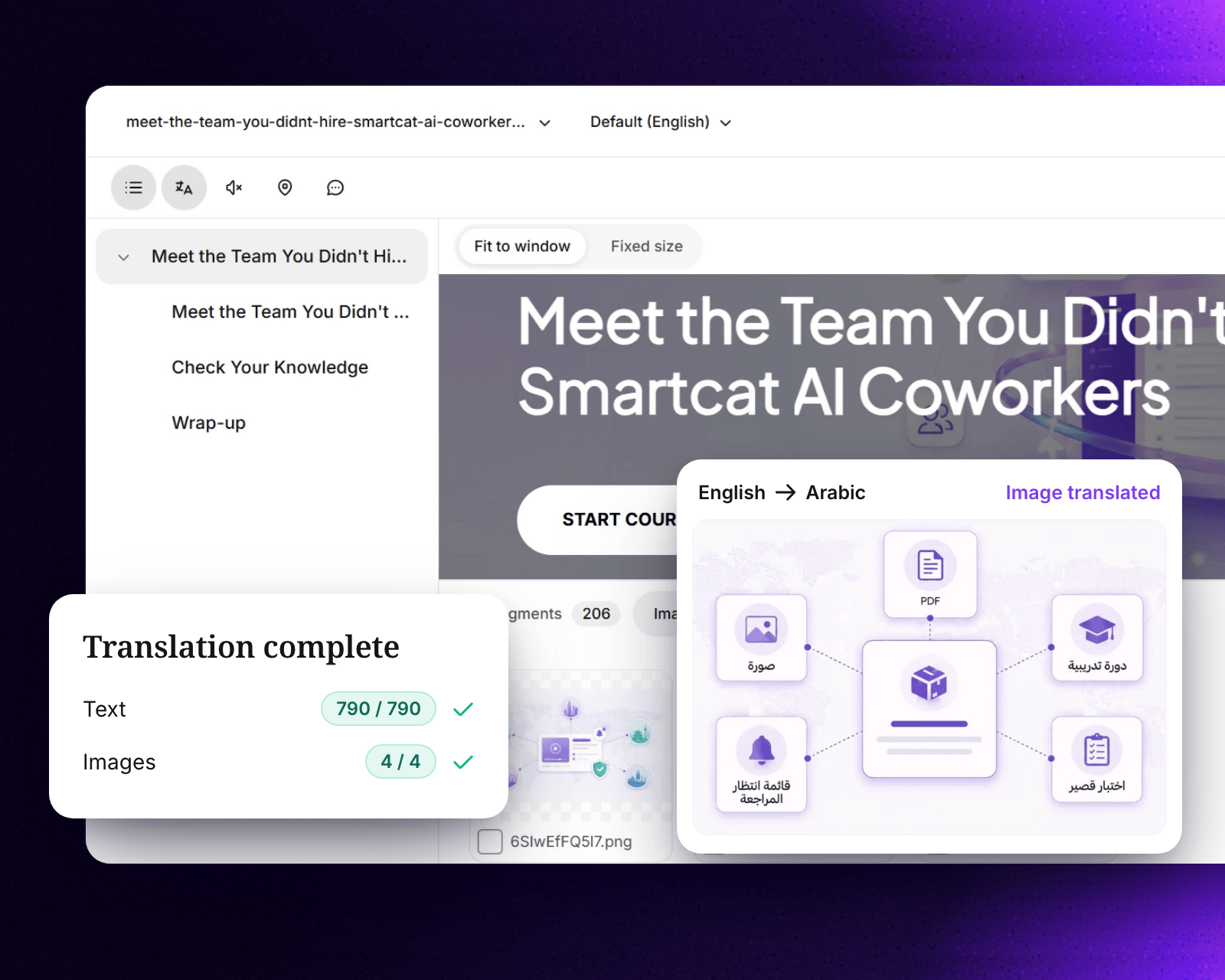
A SCORM course in Smartcat with an image translated from English to Arabic and the translation marked complete

More than 80 of the world’s largest companies have chosen Smartcat

What is SCORM translation?

SCORM translation adapts a SCORM (Sharable Content Object Reference Model) course for learners who speak another language. The text, quizzes and media are translated, while the package still launches and reports progress in your LMS. Smartcat translates the exported package itself, so you don’t rebuild the course, and every language keeps the same layout and interactivity.

15K+

eLearning courses localized

Smartcat has localized more than 15,000 eLearning courses.

280+

languages

Translate one course into 280+ languages, including right-to-left languages, in a single project.

80+

file formats

Beyond SCORM packages, translate the XLIFF exports, slide decks, PDFs and videos around a course.

SCORM Studio walkthrough (3:04): a published course, from upload to export in another language.

SCORM translation before and after Smartcat

Translating a SCORM course used to mean a chain of hand-offs between tools and vendors, repeated for every language. In Smartcat it is one project, from the uploaded package to a course that is ready to publish.

Before: a chain of hand-offs

× every language× every update

With Smartcat: one project

Every language at once

Export the text

Strings leave the authoring tool without the slides around them.

Upload the course

Add the published SCORM package as it is.

Send media on a separate track

Images, subtitles and audio go to other tools and vendors.

Review the source

Fix the original in context and choose which media to localize before you pay to translate it.

Translate without context

Translators see sentences, not the course, so layout and meaning problems surface late.

Translate with AI

Smartcat AI translates with your translation memory and glossary, and linguists see every segment in the live course.

Review by screenshots

Reviewers mark up screenshots, round after round.

Review inside the live course

Reviewers edit the real course in its own player, and every edit writes back to translation memory.

Rebuild and re-test

Translations are imported back, layouts are fixed and the course is tested again.

Export, ready to publish

Download it in the original format, as Dynamic SCORM or as one package with every language.

  • No rebuild

    The course, its design and its player stay intact.

  • One surface for every role

    Managers, linguists and reviewers all work in the real course.

  • Assets that compound

    Every edit grows your translation memory and glossary.

How to translate a SCORM package with Smartcat

Smartcat translates the exported SCORM package, not text copied out of it, so nobody rebuilds the course afterwards. Six steps take a course from your authoring tool to every language in your LMS.

Your SCORM .zip

SCORM 1.2 or SCORM 2004, exported in one source language.

  • Text and quizzes
  • Images and video
  • Attached PDFs
  • Tracking in imsmanifest.xml

One Smartcat project

AI translates with your glossary and translation memory, and your reviewers approve every language.

  • Glossary
  • Translation memory
  • Reviewer approval
  • Every language at once

One multilingual .zip

Every language in one package for your LMS, with navigation and tracking unchanged.

  • English
  • Français
  • Deutsch
  • Español
  • 日本語
  • العربية
  1. Export the SCORM package

    Export the course as a SCORM 1.2 or SCORM 2004 .zip. Smartcat translates packages exported from Articulate® Rise® directly; for iSpring Suite, Adobe Captivate and other supported tools, use SCORM Studio.

  2. Upload it and choose your languages

    Upload the .zip and select every target language in one project, with no separate upload per language.

  3. Review the source and pick the media

    Fix the original in context first, so you only pay to translate approved text. Smartcat detects the images, videos and attached PDFs inside the course, and you choose which ones to translate.

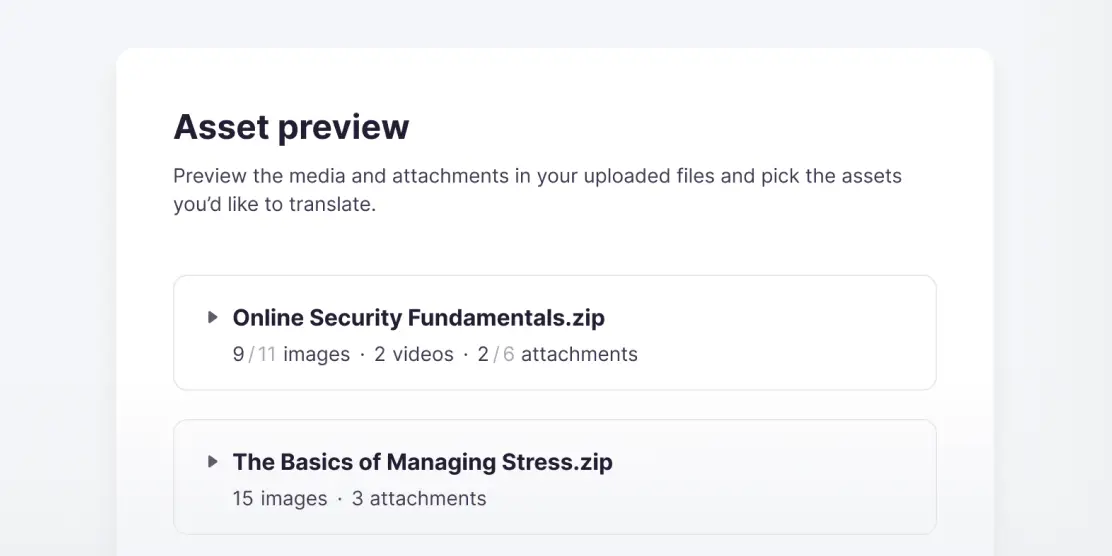
Smartcat asset preview listing two uploaded SCORM packages with their images, videos and attachments

Picking assets in Smartcat

The asset preview lists every SCORM package you upload with the images, videos and attachments inside it. Include or skip each one before translation starts, so handouts and videos ship in the same languages as the lessons.

  1. Translate with your glossary

    The Content Translator Coworker translates course text, quiz questions and feedback with your glossary and translation memory.

  2. Review and approve each language

    Your reviewers or Smartcat Marketplace linguists edit the real course in its own player, and every edit writes back to your translation memory.

  3. Export the translated package

    Download the course in its original format, as Dynamic SCORM or with every language in one file, and upload it to your LMS. See how multilingual SCORM packages work in your LMS.

See these six steps on one of your own SCORM courses

SCORM translation software built for L&D teams

Without SCORM translation software, every new language brings back the same three problems:

  • Every language is a rebuild: translated text comes back from a vendor, and someone pastes it into each screen of the authoring tool.
  • Reviews happen over email: in-country experts mark up copies, and their fixes aren’t saved for the next course.
  • Every approved change starts the chain again: one edit to the source course means new exports, translations and LMS uploads in every language.

Smartcat keeps the package, the translation and the review in one project, as part of its training translation platform for L&D teams.

Which SCORM packages Smartcat translates

Upload the SCORM .zip you already export and pick every target language in one project. Smartcat translates packages exported from Rise without the authoring files and returns one multilingual package for your LMS. For courses from iSpring Suite, Adobe Captivate and other tools, or courses whose source files are gone, use SCORM Studio.

Translate every asset in one project and pay once for repeats

Course text, images, videos and attached PDFs stay in one project instead of being split across vendors and tools. Your glossary and translation memory apply to every course, and on current plans 100%+ translation-memory matches use no Smartwords, so content you reuse across courses isn’t paid for twice.

Translate with your glossary, then approve every language

The Content Translator Coworker translates each course with your glossary and translation memory, and the Reviewer Coworker prepares every language for review. Your trainers, subject-matter experts or Smartcat Marketplace linguists approve each version before export. 92% of words translated by Smartcat AI are accepted without a single human edit.

Translation tools that work inside the course

Translators and reviewers keep the tools they rely on, next to the live course. Comment threads and edits stay in sync with Smartcat’s translation editor, and every change grows your translation memory and glossary, so the next course is faster and more consistent.

Translation memory

Matches appear next to every segment, and reviewer edits write back to memory.

Glossary in context

Terms show where they are used, and you can add a new term straight from the segment.

QA checks

QA warnings and tag errors show before a translation is saved.

Find and replace

Change a word or term across the whole course translation at once.

Repetitions and history

Repeated segments are marked, and every segment shows who changed what.

Point and find

Click text on the course page to open its segment, and jump from the segment back to the page.

What Smartcat translates inside a SCORM package

Smartcat translates what learners read, see and hear: course text, quizzes, images, video and attached PDFs. It writes the manifest and tracking settings back unchanged, so the course still launches and reports to your LMS. Where support depends on how a course was built, the table says so.

SCORM elementWhat it includesHow Smartcat handles itWhat to check
Course textLesson titles, body text, headings, lists and image captionsTranslated with AI using your glossary and translation memory, then reviewed by your team or Smartcat linguistsGerman and French run longer and can overflow buttons, tabs and fixed-size blocks, and Chinese, Japanese or Korean need a font with their characters. Preview each language and shorten in review rather than redesign the screen
Quiz questions and feedbackQuestions, answer options, correct and incorrect feedback, knowledge checksTranslated with the course text; scoring and answer logic stay as you built them, and reviewers preview each question as learners see itQuestions that rely on wordplay, alphabetical order or a term defined elsewhere may need rewriting; your glossary keeps those terms consistent
Buttons and navigation labelsContinue, Next, Submit, menu and progress labelsCheck with us: some labels come from the authoring tool’s player settings rather than the course contentPreview every screen, including the menu and the completion screen
Images with textDiagrams, infographics and screenshots with words in themDetected in the package; you choose which images to translateSoftware screenshots may need a localized screenshot instead
Video and audioEmbedded training videos, narration and voiceoverVideos are detected and you choose which to translate. For standalone audio files, check with usText burned into video frames is out of scope, so plan new graphics or captions. For videos you also use outside the course, see Smartcat video translation
Attached filesPDF handouts, job aids and other downloads inside the packageAttached PDFs are detected and you choose which to translate, so handouts ship in the same languages as the lessons. For other file types, check with usFiles linked from outside the package are not part of it
Right-to-left languagesArabic, Hebrew and other right-to-left languagesTranslated in the same project as your other languagesHow much of the layout mirrors depends on the course template and player; see right-to-left SCORM delivery in your LMS
Multi-SCO packagesSeveral sharable content objects in one .zip, each tracked separately by the LMSCheck with us before you scope the project: every SCO and the manifest that ties them together must come through intactBook a demo with a sample package to confirm how it comes through for your LMS
Tracking and manifestimsmanifest.xml, the SCORM 1.2 or SCORM 2004 version, completion and scoring settingsNot translated: the manifest, version and tracking settings are written back unchanged, so every language launches and reports like the sourceExport the source in the SCORM version your LMS expects, then run a completion test for each language before rollout

Smartcat translates SCORM 1.2 and SCORM 2004 packages exported from Rise without the authoring files. Courses from iSpring Suite, Adobe Captivate, Easygenerator, Absorb Create or CEGID go through SCORM Studio. Using another authoring tool? Export XLIFF, and Smartcat returns the translated file for re-import: see course file translation. Book a demo to check a package with custom interactions.

Beyond translation: localization, updates and regional variants

The table above covers each part of a SCORM package. These three jobs come up once the first translation is done: adapting a course for one market, keeping every language current, and serving regional variants.

SCORM localization goes beyond translation

Translation changes the words and keeps the course’s tracking intact. Localization also adapts the course for one market. Smartcat does both in one project.

SCORM translation changes
Course textQuizzesCaptions
SCORM localization also adapts
ExamplesNamesCurrenciesImages with textVoiceoverRight-to-left layout

AI translates the course, you choose which images, videos and attachments inside the package to translate, and regional reviewers adapt the rest.

Updating a translated course after the source changes

Re-translate only what changed instead of the whole package. Nothing reaches learners until your team approves it.

  1. Edit the sourceUpdate text or media in the Smartcat course editor
  2. Re-translate the changesOnly new or changed sections, into every language
  3. Reuse approved text100%+ memory matches use no Smartwords on current plans
  4. ApproveYour team signs off before learners see it

The Content Update Coworker helps you find the courses a change affects and prepares updates for review.

Regional variants such as Canadian French get their own version

Smartcat handles each regional variant as a separate target language in the same project. Route each one to an in-country reviewer, and their edits are saved to translation memory for the next course.

Each gets its own version of the course

Canadian FrenchEuropean FrenchLatin American SpanishBrazilian Portuguese
6 weeks

for Intradiem to translate 20 Rise courses into Canadian French, with a publication-ready first pass

The AI coworkers behind the work

Each coworker handles one step of SCORM translation, from the first draft to the final check. Your reviewers approve every language before export.

Connect Smartcat to the tools your training content lives in

Translate and review content where your teams already work, from Google Drive and Figma to your help center and CMS. See all integrations

What global L&D teams achieved with Smartcat

Enterprise L&D teams translate courses with Smartcat to cut editing time and agency costs. Each number below comes from a named customer case study.

70%

lower translation costs

Stanley Black & Decker cut translation costs by up to 70%.

4x

faster turnaround

Smith+Nephew reduced editing workload by 70% and turns courses around 4x faster than its previous 10‑day agency SLA.

298

translation projects

Topcon ran 298 projects in two years across 29 countries and 31 languages, and cut one 10-language course from 13 h to 11 h.

“With Smartcat, we’ve found the optimal balance between automation and local expertise, allowing us to accelerate translation while improving quality and consistency. Beyond the operational efficiencies, it has helped us build stronger relationships with our global affiliates and create a truly scalable model for global content delivery.”
Andrew Viglione
Andrew ViglioneSenior Director, Global Commercial Learning & Development, Gilead

See what your next SCORM course looks like in every language

What learning and localization teams say on G2

How Smartcat protects the course content you translate

Training often covers unreleased products, internal policies and compliance rules. Smartcat protects that content at every step; see how on the Smartcat security page.

Role-based access controls

Set who can view, translate, review and approve courses by team, role or region on enterprise plans.

Single sign-on (SSO)

Sign in through your existing identity provider on enterprise plans.

SOC 2 Type II compliant

Smartcat is SOC 2 Type II compliant and isolates every workspace.

Never used to train public AI models

Your course content is never used to train public AI models.

Audit trails

See who changed what and when across translation and review on enterprise plans.

Encryption and deletion on request

Content is encrypted in transit and at rest, and deleted or returned within 30 days of a written request.

Resources for SCORM translation

Guides from the Smartcat blog on SCORM files, SCORM translation and keeping translated courses current after an update.

Frequently asked questions about SCORM translation

How do I translate a SCORM file?

Export the course as a SCORM 1.2 or SCORM 2004 .zip, upload it to Smartcat, choose your languages and the media to translate, and have reviewers approve each language before you download the package for your LMS. For a step-by-step walkthrough, see the guide to SCORM translation with AI.

What is the best SCORM translation software?

Smartcat suits L&D teams that translate exported SCORM packages into many languages and update them often, but the best SCORM translation software depends on where your courses come from and how often they change. Whichever tool you test, check that it works without the authoring files, keeps tracking and quiz logic intact, handles media and attachments, and re-translates only what changed.

Is there a free way to translate SCORM?

Yes. Smartcat offers a free trial rather than a free plan: 15 days and 15,000 Smartwords, with no credit card required. That is enough to translate a short course into a few languages and test it in your LMS. Free machine translation tools work on text copied out of the course, so you would rebuild the package yourself afterwards.

How accurate is AI translation for SCORM courses?

Most course text needs little editing: 92% of words translated by Smartcat AI are accepted without a single human edit. Your glossary and translation memory keep product names and policy terms consistent, and reviewers check the rest in context, previewing each screen as learners will see it. Plan a full expert review for regulated or safety-critical training.

Can I translate a SCORM file with ChatGPT or Google Translate?

No. General-purpose translators and AI chat tools work on text you copy out of a course, not on the SCORM package. Smartcat translates the exported package itself. With a chat tool, you would paste the translation back into every screen, rebuild the quizzes and re-export the package for each language, and that manual rework is where errors creep in.

Which SCORM packages can Smartcat translate?

Smartcat translates SCORM 1.2 and SCORM 2004 packages exported from Rise directly, without the original authoring files. For courses published from iSpring Suite, Adobe Captivate, Easygenerator, Absorb Create or CEGID, use SCORM Studio. If your authoring tool exports XLIFF, Smartcat translates that file and returns it for re-import. Check with us before scoping packages that hold several SCOs.

Will SCORM tracking, scoring and quiz logic still work after translation?

Yes. Smartcat keeps the tracking, scoring and quiz logic of SCORM 1.2 and SCORM 2004 packages through translation, because the package structure is written back unchanged. Courses with complex custom interactions should still get a quick functional check in each language before rollout, because translated text can run longer than the source.

How long does it take to translate a SCORM course?

It depends on course length, the number of languages and how much review you add, so Smartcat doesn’t promise one turnaround for every course. Most of the elapsed time goes to review and approval, which you control. As a reference, Smith+Nephew turns courses around 4x faster than its previous 10‑day agency SLA, and Intradiem translated 20 courses into Canadian French in six weeks.

How is SCORM translation priced?

Smartcat charges by Smartwords, its single usage unit: translating one source word into one target language uses one Smartword, so a 5,000-word course in four languages uses about 20,000. Plans include a Smartwords allowance shared by unlimited users. After a source update you pay mainly for new or changed text, because 100%+ translation-memory matches use no Smartwords on current plans. See Smartcat pricing for plans.

Is my course content secure during SCORM translation?

Yes. Smartcat is SOC 2 Type II compliant, encrypts content in transit and at rest, and isolates every workspace, with role-based access, SSO and audit trails on enterprise plans. Course content, including unreleased product and compliance training, is never used to train public AI models, and it is deleted or returned within 30 days of a written request.

Is Smartcat affiliated with Articulate?

No. Smartcat is an independent platform and is not affiliated with, endorsed by, sponsored by, or otherwise associated with Articulate Global, LLC. Articulate®, Rise® and Storyline® are trademarks of Articulate Global, LLC. All product names and trademarks on this page belong to their respective owners and are used only for identification.

Didn’t find your answer? Talk to an L&D specialist

Trademark notice. Smartcat is an independent platform and is not affiliated with, endorsed by, sponsored by, or otherwise associated with Articulate Global, LLC. Articulate®, Articulate 360®, Rise®, and Storyline® are trademarks of Articulate Global, LLC. All product names, logos, and trademarks referenced on this page are the property of their respective owners and are used for identification and descriptive purposes only. Smartcat’s file-format support is built on publicly documented standards and does not imply any partnership or certification.

Give every learner the same SCORM course in their own language

See Smartcat translate one of your own SCORM courses, from upload to a multilingual package for your LMS, or start a 15-day free trial with no credit card.