GDPR-compliant organization

ISO 27001 certified organization

SOC II compliant organization

SCORM translation that delivers every language to your LMS

Smartcat translates your SCORM course and exports one multilingual package that your LMS can launch and track in 280+ languages, with every language approved by your reviewers.

Book a demo

Book a demo

Our expert gives you a tailored demo

Start free trial

Start free trial

15-day free trial, no credit card required

More than 80 of the world’s largest companies have chosen Smartcat

A SCORM course in Smartcat with the media picker open, an image translated from English to Arabic and the translation marked complete

What is multilingual SCORM delivery?

Multilingual SCORM delivery means getting every language version of a SCORM course into your learning management system, so each learner can launch the course in their language and the LMS still tracks completion and scores.

It starts with translating the package, including its text, quizzes, media and attached files. Then you choose how the languages reach the LMS: one multilingual package or one package per language. Smartcat translates the exported package directly, routes each language to your reviewers and exports one multilingual SCORM package for your LMS team to upload.

Building a new course? Start with the SCORM course builder. For the full process, read the SCORM translation guide or see how SCORM translation works in Smartcat. Courses in other formats? See LMS translation.

15K+

eLearning courses localized

Smartcat has localized more than 15,000 eLearning courses.

280+

languages

Translate one course into 280+ languages in a single project.

92%

accepted without a human edit

92% of words translated by Smartcat AI are accepted without a single human edit.

SCORM Studio walkthrough (2:58): a published course, from upload to export in another language.

Why SCORM translation stalls before courses reach learners

Translating the words is rarely the slow part. The delay sits around it: getting text out of the SCORM package, rebuilding each language, then uploading and re-testing every version in every LMS. Each course update starts the chain again.

Before: the manual chain

× every language× every LMS× every update

With Smartcat: one package

Every language in one upload

Export

Download the course from the authoring tool as a SCORM .zip.

Upload the package

Add the published SCORM .zip to Smartcat. There is no text to copy out.

Extract

Copy the text out of the package and send it to a translation vendor.

Translate inside the package

Smartcat translates the text, quizzes and media inside the SCORM package itself.

Rebuild

Paste each language back, fix the layouts and republish a package per language.

One multilingual package

Every approved language exports in one package, with navigation and tracking unchanged.

Upload

Add or update a course record for each language in each LMS.

One course record

Upload once. Each learner keeps one record and one completion status, whatever language they choose.

Re-test

Check launch, completion and scores again, one language at a time.

Test once

Check launch, completion and scores on one package instead of one per language.

  • Updates without re-uploads

    With Dynamic SCORM, changes made in Smartcat reach the course without a new export.

  • One completion report

    Results sit in one report, whatever language each learner used.

  • No version drift

    Every language changes together, so no region trains on an old version.

Which SCORM delivery option fits your LMS?

Translated SCORM training reaches an LMS in one of five ways: one multilingual SCORM package, Dynamic SCORM, one package per language, an XLIFF or XML round trip through the authoring tool, or an updated version of a live course. They differ in what your LMS team uploads, where completions are recorded and how much work every update takes.

Delivery optionWhat you upload to the LMSProsWatch-outs
One multilingual SCORM packageWhat Smartcat exportsOne .zip that holds every language version, added as one courseOne upload per update; one course record and one completion status per learner; every language changes togetherCheck how learners pick their language, and whether your reports need to show which language each learner used
Dynamic SCORMSmartcat export optionOne package, once; later changes made in Smartcat reach the course without a new export or uploadThe course link, assignments and history stay in place, and every language updates togetherEnabled per workspace, so check with your Smartcat team before you plan the rollout
One SCORM package per languageA separate .zip for each language, set up as separate courses or as language versions of one course if your LMS supports thatAssign each language by region or group; the LMS can match the course to a learner’s profile languageEvery update means one upload per language; completions are split across records; versions can drift apart
XLIFF or XML round tripThrough your authoring toolThe packages you republish from the authoring tool after re-importing each translated file, usually one per languageYour team keeps editing and fine-tuning layouts in the tool it already usesRepublishing, re-uploading and re-testing are manual for every language on every update
Updated version of a live courseThe new package, replacing the content of the existing course recordKeeps the course link, assignments and history in placeCheck how your LMS treats completed and in-progress learners, and keep the package identifier unchanged

One multilingual package also means one completion status and one score per learner. If your reports must show results by language, confirm that your LMS records the language a learner chose, or deliver one package per language.

Smartcat exports a translated course in its original format, as Dynamic SCORM or as one package with every language. If your LMS setup needs a separate package per language, book a demo to check the export options for your setup.

How to get a translated SCORM course into your LMS

Smartcat translates the exported SCORM package itself, so nobody copies text out or rebuilds a course per language. AI coworkers prepare every language, your reviewers approve it, and you export one package for your LMS.

  1. Export the course as a SCORM package

    Download the .zip from your authoring tool. Smartcat translates SCORM 1.2 and SCORM 2004 packages exported from Articulate® Rise® directly; packages published from iSpring Suite, Easygenerator, Adobe Captivate, Absorb Create and CEGID go through SCORM Studio.

  2. Upload it once for every language

    Choose all your target languages in one project. Smartcat detects the images, videos and attached PDFs in the course, and you pick which ones to translate.

  3. Translate with your terminology

    The Content Translator Coworker translates course text, quizzes and feedback with your glossary and translation memory.

  4. Review and approve each language

    The Reviewer Coworker pre-reviews every language. Your trainers, in-country reviewers or Smartcat Marketplace linguists then approve it in the browser.

  5. Export one multilingual package

    Download a single SCORM package that holds every language, so your LMS team uploads one file instead of one per language.

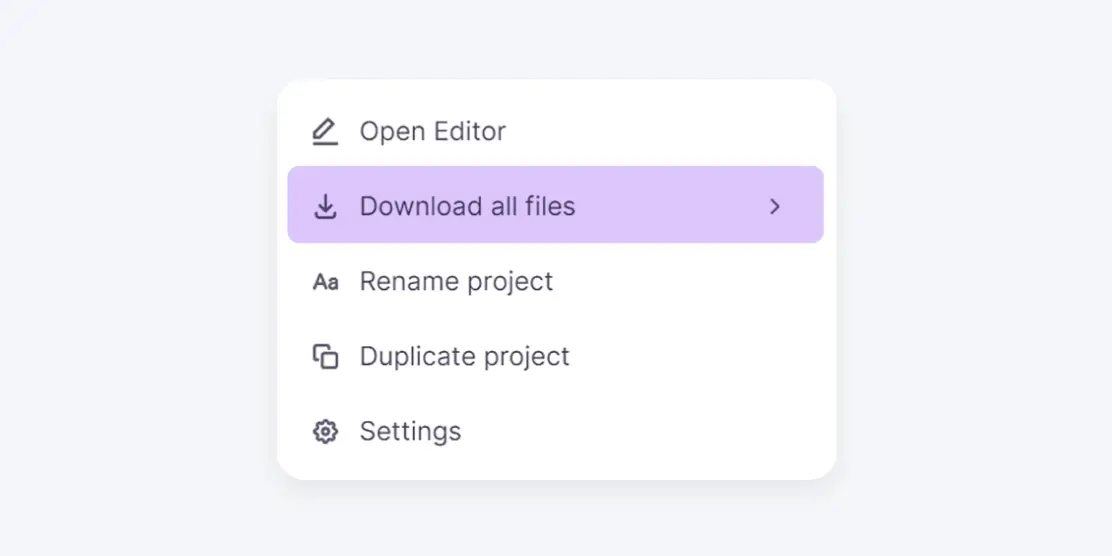
    Smartcat project menu with Download all files selected, the step that exports the translated course
  6. Test in your LMS, then roll out

    Launch the package in a test course and check completion, scores and resume in each language before you assign it to learners.

Want to see these steps on one of your own courses? Book a demo.

AI coworkers that prepare and check every SCORM course

Each coworker handles one step between the source SCORM package and the translated course in your LMS. Your team approves every language.

Connect Smartcat to the tools your training content lives in

Translate and review content where your teams already work, from Google Drive and Figma to your help center and CMS. See all integrations

SCORM translation for your authoring tool, LMS-ready in every language

Translate the whole SCORM package, or only its text export

Upload the whole SCORM package when you want a translated course that is ready for your LMS. If your team republishes courses from the authoring tool, translate its XLIFF or XML export instead, re-import it and publish each language as you do today.

Translate the video inside your SCORM courses

Training video often carries much of a course’s content. Smartcat’s video translator turns speech into editable subtitles in 280+ languages and can add AI voiceover, so every language version of the course gets matching video.

What to check before translated SCORM goes live

Short answers to the questions LMS administrators and L&D teams ask when a course goes multilingual.

Choose how each language reaches your LMS

Is a multilingual SCORM wrapper the same as a multilingual package?

No. A wrapper bundles packages that were already translated and published one per language. It doesn’t translate anything.

Wrapper
  • Packages published one per language
  • Usually behind a language-selection page
  • Every language republished on its own
Multilingual package
  • The course itself is translated
  • Every approved language in one package
  • One new export per update

Does xAPI change how a translated course reports to the LMS?

Yes, if the course is delivered as xAPI instead of SCORM. Smartcat delivers translated courses as SCORM packages, which most corporate LMSs accept.

SCORM
  • Runs inside the LMS
  • The LMS stores status, score and progress in every language
xAPI
  • Sends statements to a learning record store (LRS)
  • Your LMS must include or connect to one
  • cmi5 defines how the LMS launches it

Keep completion data and reports intact

Re-uploading an updated version without losing completion data

Replace the content of the existing course rather than creating a new one, so assignments, links and history stay in place.

Check in your LMS first

  • Do completed learners keep their status?
  • Do in-progress learners restart or stay on the old version?
  • Does a changed package identifier make it a new course?

Test the replacement with one pilot learner first.

In Smartcat, re-translate only the new or changed sections before you export. With Dynamic SCORM, those changes reach the course without a new upload.

Tracking completion across language versions

It depends on how you deliver the languages.

One multilingual package
  • One course record per learner
  • Completion in one report, whatever the language
One package per language
  • Completions split across course records
  • Build a report or learning path that counts any language as complete

Decide early whether you also need to see which language each learner chose, and check that your LMS can report it.

Test every language, then roll out by region

Testing a translated SCORM package before rollout

Test each translated package in a staging area or test course of your LMS before learners see it.

In every language, check that

  • The course launches
  • Navigation works
  • Completion and score are reported
  • A closed course resumes where the learner left off
  • Quiz feedback is in the learner’s language
  • Button labels and completion messages too

Translating SCORM courses into German, French, Japanese or Arabic

Preview every language in Smartcat before export, then test the longest language and any right-to-left language first in your LMS.

  • GermanFrench
    Text runs longer, so buttons, quiz options and fixed-size text boxes can overflow
  • JapaneseChineseKorean
    Need fonts your course theme may not include
  • ArabicHebrew
    Read right to left

Translating LMS catalog titles, descriptions and notifications

These usually live in the LMS, outside the SCORM package, so translating the course doesn’t translate them.

Outside the package

Course titlesDescriptionsKeywordsEnrollment emailsCertificates
  1. List themFor each language, before rollout
  2. Translate in SmartcatAs a document or spreadsheet, with the course glossary
  3. Enter them in the LMSIn the course record’s language fields

Rolling out multilingual SCORM training globally, region by region

Roll out in stages, and assign the course by region, language or job role, depending on how your LMS targets audiences.

  1. Owner signs offOne owner per language, before assignment
  2. Pilot groupFor each language first
  3. Full audienceRegion by region

Leave time for local review in your due dates. For mandatory training, keep a record of which version and language each region received.

Results from L&D teams that translate courses with Smartcat

Published case studies from L&D teams that moved course translation to Smartcat.

Up to 70%

lower translation costs

Stanley Black & Decker got up to 70% lower translation costs with Smartcat.

20

courses in Canadian French in 6 weeks

Intradiem translated 20 Rise courses into Canadian French in six weeks, with a publication-ready first pass.

4x

faster than the previous 10‑day agency SLA

Smith+Nephew reduced editing workload by 70% and localizes 15–20 courses per language each quarter.

31

languages, managed by one program manager

“I often get requests asking, ‘Can you and your team do this?’ I have to remind them there is no team. That’s me. Smartcat allows me to manage a volume of work that would normally require an entire team.”

Topcon has completed 298 translation projects in two years across 29 countries.

Read the Topcon case study
Michelle Quirke
Michelle QuirkeProgram Engagement Manager, Topcon

Check how a translated course will run in your LMS

What LMS administrators ask before the first upload

“Every region runs a different LMS.”

SCORM is the format most LMSs accept, so one translated package can go to each of them. Test it once in every LMS you use, because each one handles language versions and reporting a little differently.

“Compliance courses need sign-off in every language.”

Smartcat gives every language its own sign-off before export. AI coworkers prepare each language, your reviewers approve it, and nothing is exported for your LMS until they do. Every approved edit is saved to your translation memory for the next update.

“Our courses come from more than one authoring tool.”

Smartcat translates SCORM packages from Rise and from the tools SCORM Studio supports, but not from every authoring tool yet. For other tools, translate the XLIFF or XML export and republish the course from the tool. Check your package format before you plan the rollout.

What L&D teams say about Smartcat on G2

Questions about translating SCORM courses for your LMS

What is the best way to deliver translated SCORM courses to an LMS?

The best way is the one your reporting can live with. Ask three questions before the first upload: does your LMS assign training by region, does each report need to show the learner’s language, and how often will the course change? Smartcat exports one multilingual SCORM package, which suits frequent updates and one course record per learner.

How do I upload a translated SCORM package to my LMS?

Export the translated course from Smartcat as one multilingual SCORM package, then upload the .zip in your LMS the same way as any SCORM course: as a new course, or as new content for an existing one. Launch it in a test course first and check completion, scores and resume in each language before you assign it to learners.

Will my LMS accept a translated SCORM package?

Yes. Smartcat exports translated courses as SCORM packages, which any SCORM-compliant LMS is built to run. Check that your LMS supports the SCORM version of your source course, SCORM 1.2 or SCORM 2004: the version is named in the imsmanifest.xml file at the root of the .zip.

Then test the translated package once in each LMS you use, because LMSs differ in how they display language choices and report results.

Is course content secure while Smartcat prepares it for the LMS?

Yes. Smartcat is SOC 2 Type II compliant, encrypts content in transit and at rest, and isolates every workspace, with role-based access, SSO and audit trails on enterprise plans. Your course content is never used to train public AI models, and it is deleted or returned within 30 days of a written request. Details are on the security page.

Will a multilingual SCORM package be too big for my LMS?

It can be, if the course carries a lot of media. Translated text adds little to the .zip, but every language that has its own video, audio or images adds those files in full.

Check the maximum SCORM upload size in your LMS before export, then test the upload with the finished package. If it’s over the limit, book a demo to check the export options for your setup.

Can I add a new language to a course that’s already live in my LMS?

Yes. Add the language to the same Smartcat project, translate and approve it, and export the package again. Approved text in the existing languages is reused from translation memory. Then replace the content of the existing LMS course and test with one pilot learner, so assignments and completion history stay in place.

Can Smartcat translate SCORM courses into right-to-left languages?

Yes. Smartcat translates SCORM courses into right-to-left languages such as Arabic and Hebrew. Before rollout, preview each right-to-left version and test it in your LMS, because layouts, navigation buttons and mixed left-to-right text such as product names can display differently than in the source.

Does Smartcat need the original authoring files to translate a SCORM course?

No. Smartcat translates the exported SCORM .zip directly, so nobody has to reopen the authoring tool or share project files. Rise packages go through Smartcat itself, and packages from iSpring Suite, Adobe Captivate and other supported tools go through SCORM Studio, which translates courses without source files.

Who approves each language before the course goes to the LMS?

Your team does. In Smartcat, the Content Translator Coworker translates each language and the Reviewer Coworker pre-reviews it; then your trainers, in-country reviewers or Smartcat Marketplace linguists approve it in the browser. Nothing is exported for your LMS until you approve it, and users are unlimited, so adding reviewers adds no seat costs.

Is Smartcat affiliated with Articulate?

No. Smartcat is an independent platform and is not affiliated with, endorsed by, sponsored by, or otherwise associated with Articulate Global, LLC. Articulate®, Rise® and Storyline® are trademarks of Articulate Global, LLC. All product names and trademarks on this page belong to their respective owners and are used only for identification.

Didn’t find your answer? Talk to an L&D specialist.

Trademark notice. Smartcat is an independent platform and is not affiliated with, endorsed by, sponsored by, or otherwise associated with Articulate Global, LLC. Articulate®, Articulate 360®, Rise®, and Storyline® are trademarks of Articulate Global, LLC. All product names, logos, and trademarks referenced on this page are the property of their respective owners and are used for identification and descriptive purposes only. Smartcat’s file-format support is built on publicly documented standards and does not imply any partnership or certification.

Deliver your next SCORM course in every learner’s language

See translation, review and LMS delivery on one of your own courses, or start a free trial with 15 days and 15,000 Smartwords, no credit card required.