GDPR-compliant organization

ISO 27001 certified organization

SOC II compliant organization

CAT tool: translate in your browser with memory, glossaries and QA

Smartcat is a cloud-based computer-assisted translation (CAT) tool for translation companies and in-house localization teams. It splits each file into segments, fills matches from your translation memory, enforces your glossary and runs QA checks, then returns the file in its original format. Project management, client hand-offs and Marketplace linguists sit in the same platform.

Book a demo

Book a demo

Our expert gives you a tailored demo

The Smartcat CAT editor with source segments, the editing toolbar and AI actions such as Translate, Rephrase and Shorten

More than 80 of the world’s largest companies have chosen Smartcat

What is a CAT tool in translation?

A CAT tool (computer-assisted translation tool) is software that helps a human translator work faster and more consistently. It splits a document into segments, suggests matches from a translation memory of earlier approved translations, highlights terms from the glossary (termbase) and runs quality checks, while the translator decides every segment. That is CAT translation: the repetition and checking are automated, the judgment stays human.

Smartcat is a cloud CAT tool built for teams. Translation companies and in-house localization teams run the whole project in one place: the CAT editor with memory, glossaries and QA, AI drafts for unmatched segments, assignment, a client portal and Smartcat Marketplace linguists. Client files in XLIFF, SDLXLIFF or MQXLIFF open without the original software. Read more: what is a CAT tool.

92%

of AI-translated words accepted unedited

92% of words translated by Smartcat AI are accepted without a single human edit.

280+

languages

Translate between 280+ languages in one CAT editor.

80+

file formats

80+ file formats, including Word, PDF, IDML, XLIFF, SDLXLIFF and MQXLIFF.

Anatomy of a segment in the Smartcat CAT editor

  1. 1

    Welcome to the user guide.

    Willkommen im Benutzerhandbuch.

    100%
  2. 2

    Click 1Save2 to keep your changes.

    Klicken Sie auf 1Speichern2, um Ihre Änderungen zu behalten.

    87%
  3. 3

    Tighten the bolt to 40 Nm.

    Ziehen Sie die Schraube mit 45 Nm an.

    QA
  4. 4

    Contact your administrator.

    Wenden Sie sich an Ihren Administrator.

    AI
  • Segments

    The file is split into segments, usually one sentence each, with source and target side by side.

  • Translation memory match

    100% means the same sentence is already in your memory. 87% is a fuzzy match to edit.

  • Glossary term

    Approved terms are highlighted, and QA flags a target that doesn’t use them.

  • Locked tags

    Formatting tags are protected, so the file rebuilds in its original format.

  • QA check

    Checks flag mismatched numbers, tags, spelling and punctuation before delivery.

  • AI draft

    Segments with no memory match get an AI draft that follows your glossary, for a linguist to confirm.

The overhead a desktop CAT tool adds before you translate a word

A license and an installer on every computer, a project package emailed out and back, and a translation memory that lives on one laptop. Every project still passes through five hand-offs before the client sees a word.

  1. Receive

    A client emails a package, or a format your installed version may not open.

  2. Prepare

    Someone unpacks, converts and splits the files, then sends one package per linguist.

  3. Translate

    Each linguist works in a local copy of the memory, so fixes stay on one laptop.

  4. Review

    The reviewer gets another package, and two edited copies come back to reconcile.

  5. Deliver

    Files are rebuilt, checked and returned, and the master memory is updated by hand.

× every client× every language× every update

Six months in, the team has four memories that disagree, and project managers spend the week moving files instead of managing work.

AI translation with human review in a CAT tool

Smartcat combines AI with professional translation. AI coworkers prepare drafts and checks with the client’s glossary and memory, your linguists confirm every segment in the CAT editor, and your project manager approves each file before it leaves.

AI coworkers prepare

Routine segments arrive with a draft.

  • Content Translator Coworker

    Pre-translates unmatched segments with the client’s glossary and translation memory.

  • Reviewer Coworker

    Pre-reviews each language for fluency, tone and terminology.

  • Quality Assurance Coworker

    Checks terminology, tags and formatting and classifies each issue by severity.

Linguists decide

Professional judgment on every segment.

  • Translators

    Edit or confirm each AI draft and memory match in the CAT editor.

  • Editors and proofreaders

    Review the confirmed text in a second stage before delivery.

  • Smartcat Marketplace linguists

    Cover a language or subject your team doesn’t, inside the same project.

You approve

Nothing leaves without sign-off.

  • Your project manager

    Checks the QA report and approves each file before export.

  • Translation memory

    Keeps every confirmed segment, so the next project starts from your linguists’ decisions.

A cloud CAT tool with project management built in

Smartcat puts the CAT tool, project management and linguist sourcing in one browser workspace. Files come in as clients send them, linguists work in the same file, and every confirmed segment is reused on the next project.

Before: a desktop CAT tool plus email

× every client× every language

With Smartcat: one cloud platform

Every file, every linguist

Unpack and convert

Client packages are converted by hand, or wait for a software upgrade.

Upload the file as it is

XLIFF, SDLXLIFF, MQXLIFF, Trados packages and 80+ formats open in one editor.

Memory on one laptop

Each linguist’s copy drifts, and fixes never reach the next project.

One shared memory

Every confirmed segment is saved to the client’s memory for everyone.

Email the package

Files go out to translators and reviewers, and two copies come back.

Same file, same time

Translators, editors and managers work in one browser editor.

QA at the end

Errors surface after delivery, in the client’s own review.

QA while you translate

Checks flag numbers, tags and terms before the file is exported.

Search for a linguist

A new language means a new search and a new contract.

Linguists in the project

Invite your own team or hire from Smartcat Marketplace in the same project.

A browser CAT editor with memory, glossary and QA

Smartcat splits each file into segments, fills matches from your translation memory, highlights approved terms and runs QA checks as linguists work. Formatting tags stay locked, so the file rebuilds in its native format. There is nothing to install, so a new translator or reviewer starts from an email invitation.

Real-time collaboration, so nothing gets emailed around

Translators, reviewers and project managers work in the same file at once and see each other’s changes in real time. There is no package to export, no copies to reconcile and no “which version is current” question. Managers lock segments that must not change, and comments stay on the segment they are about.

Exchange formats that keep client hand-offs intact

Clients on other CAT tools send SDLXLIFF, MQXLIFF, XLIFF or Trados packages, and Smartcat opens them without the original software. Memories move in and out as TMX, and glossaries arrive from Excel or MultiTerm XML, so moving a client to Smartcat doesn’t mean starting from an empty memory.

Linguists when you need them

Keep your own linguists in My Team with private notes and negotiated rates, or hire vetted freelancers from Smartcat Marketplace for a language or subject you don’t cover. Each Marketplace profile shows language pairs, rates, competency levels and the words already translated in Smartcat.

Try the CAT tool on one of your own client projects

Who uses a CAT tool on a translation project

Translation companies, in-house localization teams and freelance translators use Smartcat for computer-assisted translation. On a project, managers, translators, reviewers and clients each see the part they need in one workspace, instead of passing files between tools.

Project managers

Create projects, attach the client’s memory and glossary, assign whole documents or selected segments, set deadlines and follow progress per linguist.

  1. CreateFiles, languages, memory
  2. AssignTeam or Marketplace
  3. TrackProgress per linguist

Translators

Translate in the browser CAT editor with memory matches, glossary terms, QA warnings and comments beside each segment.

Beside every segment

Memory matchesGlossary termsQA warningsSegment commentsAI drafts

Editors and reviewers

Review in the same file while translation continues. Corrections go straight into the shared memory, so the next translator gets them.

Desktop CAT tool
  • A separate review package
  • Fixes merged by hand
In Smartcat
  • Same file, same time
  • Fixes saved to memory

Clients

Clients upload files and pick languages in a client portal, see a cost estimate based on your rates before approving, and get files back in their original format.

  1. UploadFiles and languages
  2. EstimateBased on your rates
  3. ReceiveOriginal format

What changes when you move from a desktop CAT tool, and what stays

Your memories, termbases and clients stay yours

Smartcat imports what your current CAT tool exports, so you keep your history and your clients keep their formats.

Stays as it is
Translation memoriesTermbasesClient file formatsYour linguists
Moves into Smartcat
Emailed packagesLocal memory copiesQA at the endA separate TMS

Start with one client, not a migration

Import one client’s memory and glossary, run their next project in Smartcat with your own linguists, and compare the result with your current setup.

  1. ImportTMX, SDLTM or XLSX
  2. TranslateOne live project
  3. CompareTime, leverage, rework

Your linguists keep their habits

The CAT editor uses the familiar layout: source and target side by side, segment by segment, with matches and terms beside each line. Linguists join from an email invitation.

  • Segment grid
  • Memory matches with a percentage
  • Glossary highlights
  • Nothing to install

When switching isn’t worth it yet

Smartcat runs in the browser and needs an internet connection. If most of your work happens offline, or a client requires delivery from a specific desktop tool, a desktop CAT tool may still fit better.

Count how many of last quarter’s projects needed offline work or a client-mandated tool before you switch.

Desktop CAT tool, cloud CAT tool or TMS: which do you need?

Most translation teams use more than one kind of tool. Here is what each setup covers and where Smartcat fits.

Desktop CAT toolSeparate TMSSmartcat
Where translators workSoftware installed on each computerA connected CAT tool, often desktopA browser CAT editor, nothing to install
Translation memoryLocal files, shared by sending themA server memory, if the CAT tool connectsOne shared memory per client, updated as segments are confirmed
CollaborationOne person per packageWorkflow states, editing elsewhereTranslators, editors and managers in the same file at once
Client filesFormats your installed version readsDepends on the connected CAT tool80+ formats plus XLIFF, SDLXLIFF, MQXLIFF and Trados packages
LinguistsFound and contracted separatelyVendor records, sourcing elsewhereYour own team plus Smartcat Marketplace in the same project
Offline workYesDepends on the CAT toolNo, it needs an internet connection
Best forOne translator who works offlineLarge programs with a separate editorTeams that translate, review and deliver for many clients

Smartcat combines the CAT tool and the TMS in one platform, so there is no connector to maintain between them.

How to use a CAT tool: a translation project in Smartcat

To use a CAT tool, upload a file, attach a translation memory and glossary, and translate segment by segment while QA checks run, then export the file in its original format. In Smartcat that takes six steps, for one translator’s file or a client program in twenty languages.

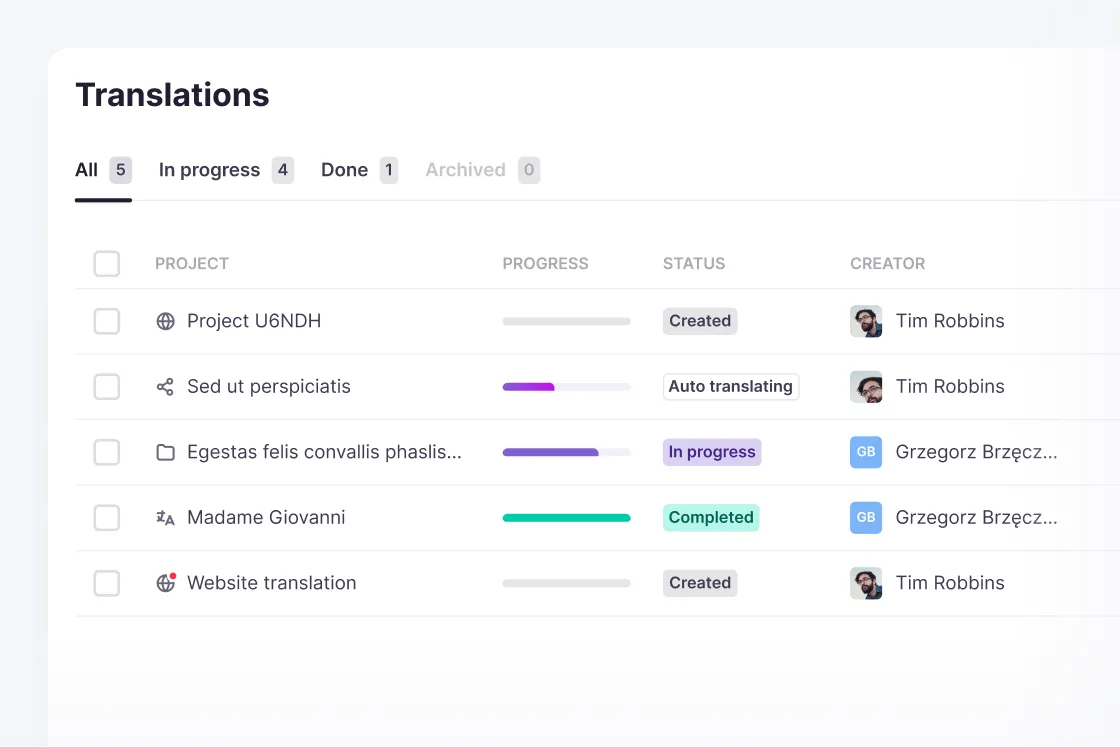
  1. Create a project and upload files

    Name the project, choose source and target languages and upload the client’s files: Word, PDF, IDML, XLIFF, SDLXLIFF, MQXLIFF or any of 80+ formats.

    The Smartcat projects list with progress, status and creator for each translation project
  2. Attach memory and glossary

    Attach the client’s translation memory and glossary. Memory matches fill in automatically, and segments with no match can get an AI draft.

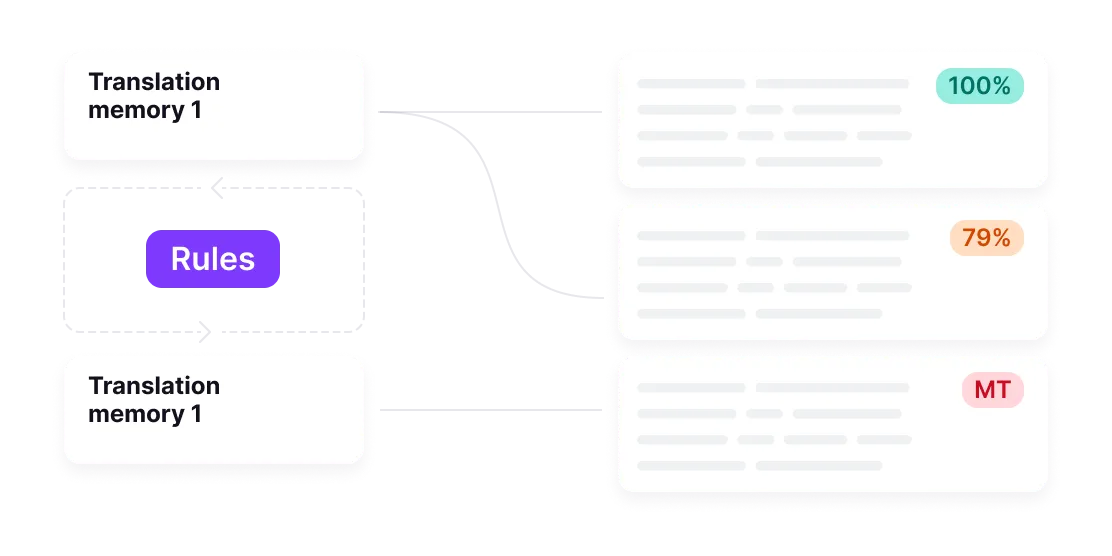
    Translation memory rules filling segments with 100% and 79% matches before machine translation
  3. Assign linguists

    Assign the whole document or selected segments to translators and editors from your team, or invite freelancers from Smartcat Marketplace, with a deadline for each.

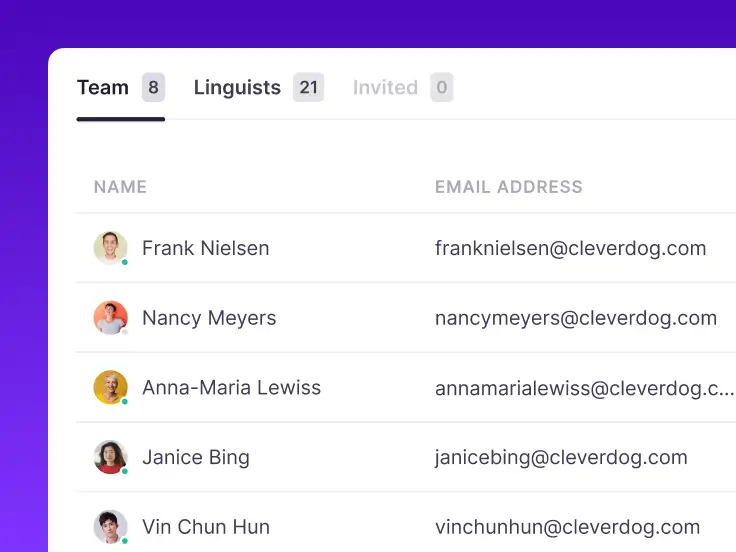
    The Team tab of a Smartcat project listing team members and linguists
  4. Translate and review

    Linguists work in the same browser CAT editor at the same time, with memory matches, glossary terms and comments beside each segment.

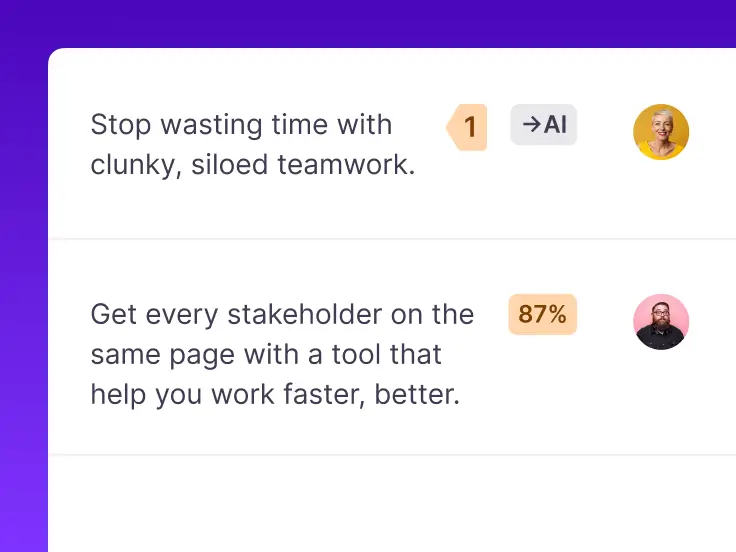
    Two segments in the Smartcat editor with match percentages and the linguists working on them
  5. Run QA checks

    Automated checks flag spelling, punctuation, terminology, formatting and consistency issues. Project managers can view or download a QA report.

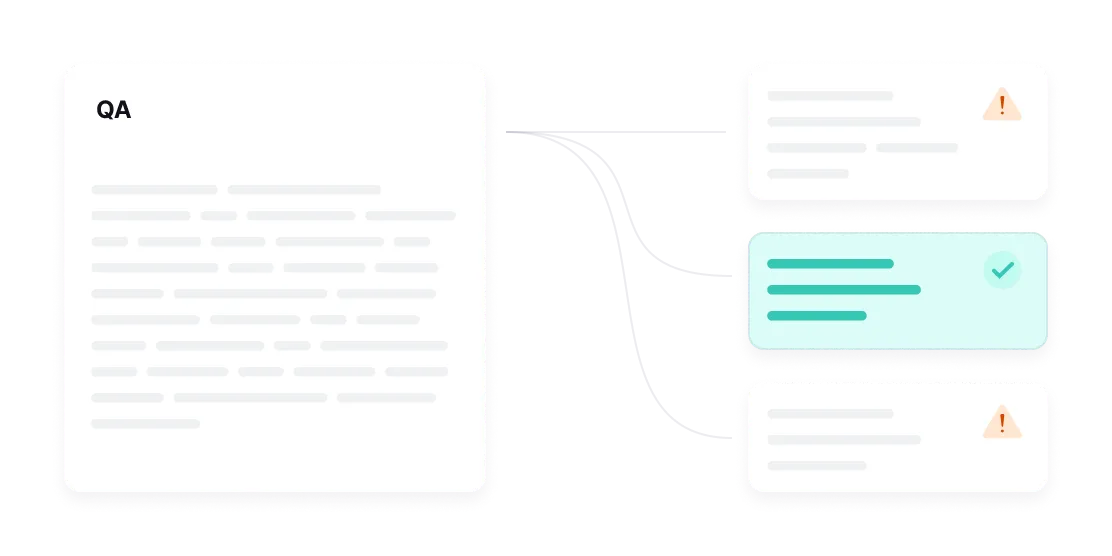
    QA checks flagging two segments and passing a third in Smartcat
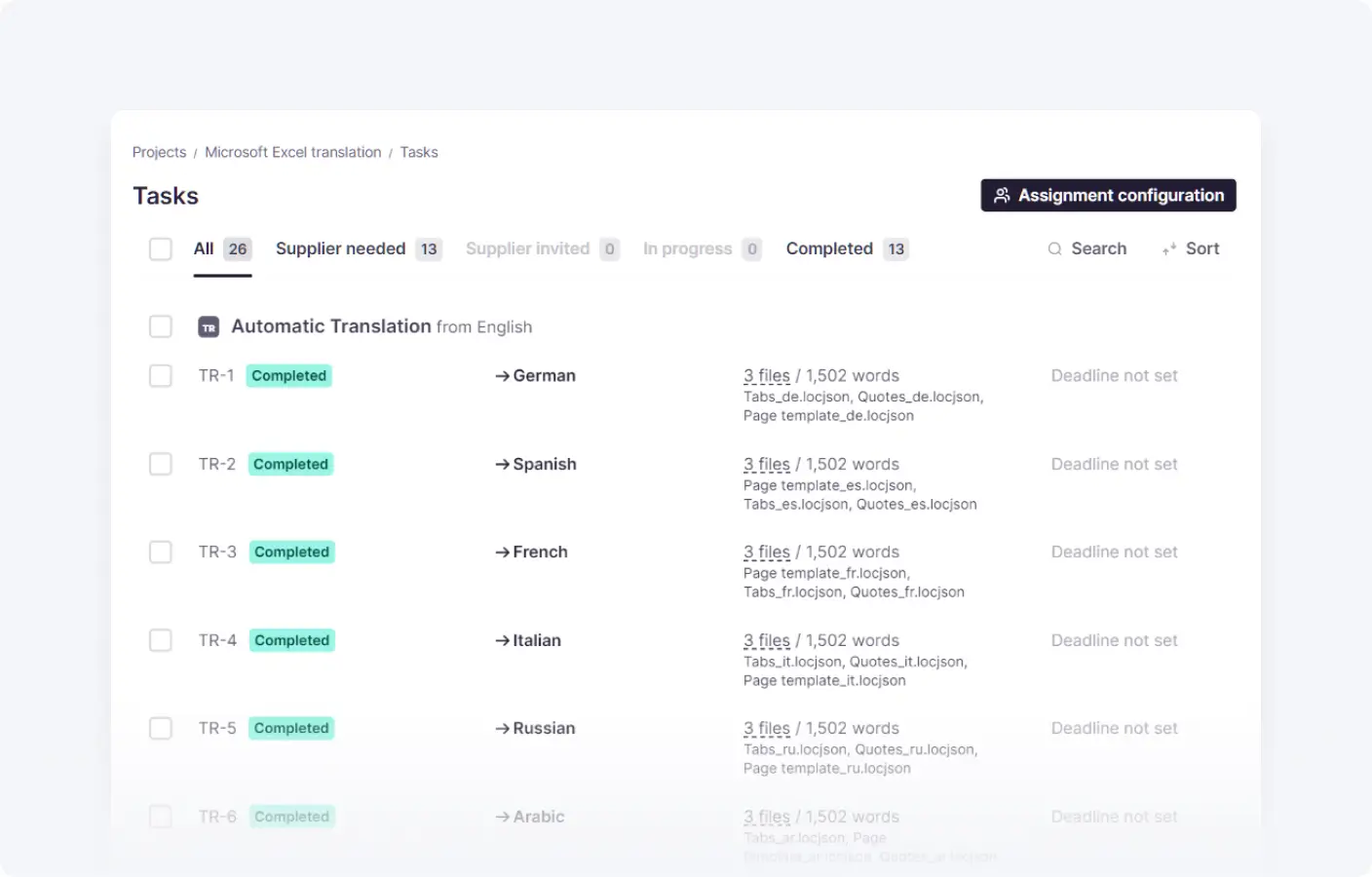
  6. Export and deliver

    Download each file in its original format, or as XLIFF for a client’s own tool. Confirmed segments stay in memory for the next project.

    A Smartcat task list with translation completed for German, Spanish, French, Italian and Russian

Run a CAT tool project on one of your client’s files

The Smartcat CAT editor: translation memory, glossaries and QA

Everything a translation team needs in the editor: shared translation memory, client glossaries, QA checks, real-time collaboration and context for linguists.

Try the online CAT editor on your own files

Which files and exchange formats does Smartcat open?

Smartcat reads the files clients send and the exchange formats other CAT tools write. The table lists the exchange formats supported as of October 2026; the guides below cover each file type.

FormatWhat it carriesUsually comes fromIn Smartcat
XLIFF 1.2 and 2.0Bilingual exchange fileCAT tools, CMSs and authoring toolsImport and translate; export as XLIFF 1.2 at any point and re-import with Update translation
SDLXLIFFTrados Studio bilingual fileTrados StudioImport and translate without Trados
SDLPPX and SDLRPXTrados project and return packagesTrados StudioAccepted as uploads
MQXLIFFmemoQ bilingual filememoQImport and translate
TTXOlder Trados bilingual fileTrados TagEditorImport and translate
TMXTranslation memory exchangeEvery major CAT toolImport and export translation memories
SDLTMTrados translation memoryTrados StudioImport into a Smartcat translation memory
MultiTerm XMLTermbase exportTrados MultiTermImport glossary terms (language terms only)
XLSXSpreadsheet glossary or memoryAny toolImport and export glossaries and memories

TMX is an open standard. Its specification, ETSI GS LIS 002 (2013), took over the LISA OSCAR TMX 1.4b standard and defines TMX as a standard way to describe translation memory data exchanged among tools and translation vendors “with little or no loss of critical data”. Source: ETSI GS LIS 002, Translation Memory eXchange (TMX).

CAT tools for translation: features, explained

The terms translation teams compare when they choose CAT tools, and how each one works in Smartcat.

Inside the CAT editor

Translation memory matches

Smartcat checks each segment against your translation memory. Exact matches fill in automatically, and fuzzy matches from 50% are offered for the linguist to edit.

  • 100%
    Same sentence as in memory: filled in
  • Fuzzy
    From 50%: similar text, edit the differences
  • No match
    AI draft or translation from scratch

Automated QA checks

QA runs while linguists translate and marks each issue in the editor. Tag errors and length-limit errors are critical by default.

What QA checks

  • Spelling
  • Punctuation
  • Terminology
  • Formatting and tags
  • Consistency with memory
  • Character length limits

AI pre-translation

Segments with no memory match can get an AI draft that follows your glossary, so linguists edit instead of typing from scratch. 92% of words translated by Smartcat AI are accepted without a single human edit.

  1. Memory firstMatches fill in
  2. AI draftFor the rest
  3. LinguistConfirms each segment

Locked tags and placeholders

Formatting tags and placeholders are protected in the editor, so the translated file rebuilds in its original format and layout.

Protected from editing

Formatting tagsVariablesSerial numbersEmail addresses

Working with clients and vendors

Trados and memoQ hand-offs

Open SDLXLIFF files, SDLPPX and SDLRPX packages and memoQ MQXLIFF files from clients who work in other CAT tools, without installing those tools.

Opens without the original tool

.sdlxliff.sdlppx.sdlrpx.mqxliff.ttx.xliff

Memories and termbases from other tools

Bring translation memories as TMX, SDLTM or XLSX and glossaries as Excel or MultiTerm XML, so a new client starts from their own history.

  • .tmx.sdltm.xlsx
    Translation memories in
  • .tmx.xlsx
    Translation memories out
  • .xlsxMultiTerm .xml
    Glossaries in

Client portal

Clients upload files and choose languages in a client portal, and see a cost estimate based on your rates before they approve the project.

  1. UploadClient’s files
  2. EstimateYour rates
  3. ApproveProject starts

Vendors and freelancers

Save freelancers to My Team with private notes and negotiated rates, invite your own linguists by email, or hire vetted linguists and agencies from Smartcat Marketplace, with AI matching and payments handled in Smartcat. Marketplace isn’t included in the Adapt plan.

Three ways to staff a project

My TeamEmail invitationsSmartcat Marketplace

Free CAT tools for freelance translators

This page is written mainly for translation companies and in-house localization teams. If you translate on your own, the Smartcat CAT editor is free with a Freelance Translator account. It runs in the browser, so there is nothing to download.

Use the CAT editor free

Freelance translators get the Smartcat CAT editor free with a Freelance Translator account. Translate your own files with translation memory, glossaries and QA, in the browser, with nothing to install.

Free with a Freelance Translator account

Your own filesTranslation memoryGlossariesQA checks

Get found by clients on the Marketplace

Publish a Marketplace profile with your language pairs, services, rates and competency levels, so clients and agencies can invite you to their projects.

Competency levels on your profile

CertifiedTest passedCourse passed

Bring your Trados and memoQ history

Import SDLXLIFF projects, SDLPPX packages and SDLTM memories from Trados Studio, MQXLIFF files and TMX memories from memoQ, and glossaries from Excel.

Imports from other CAT tools

.sdlxliff.sdlppx.sdltm.mqxliff.tmx.xlsx

Work for clients, keep your full rate

When a client assigns you a task, you work in the same editor with their memory and glossary. Smartcat takes no platform commission from your earnings; the only deductions are bank and payment processor fees.

Company teams start with the 15-day free trial instead: 15,000 Smartwords, no credit card, and a work email.

The AI coworkers behind your translation projects

Each coworker takes one routine part of a translation project. Your linguists confirm every segment, and your project manager approves every file.

Connect Smartcat to the tools your clients’ content lives in

Pull files from the systems your clients use and send translations back, or automate projects through the API. Trados and memoQ files move as exchange formats, listed above. See all integrations

Localization teams that run on Smartcat

Localization, documentation and content teams use Smartcat to translate more languages with fewer hand-offs. Each number and quote below comes from a named customer.

50%

lower costs than agencies

Huel cut localization costs by about 50% compared with agencies.

31 h

of manual work saved every month

Babbel’s localization team saves 31 hours of manual work a month with Smartcat.

10+

languages across product lines

Kaseya localizes 10+ languages across multiple product lines without increasing budget.

Veeva logo

2 wk

faster than Veeva’s six-week translation commitment, on average

“The real practical lesson is, you don’t have to choose between speed and quality if you use Smartcat. You can pair the AI automation with a dedicated marketplace project manager and certified native linguists.”

Veeva’s learning team brought in a project manager from Smartcat Marketplace and certified native linguists. Customer change requests went from dozens per course to fewer than two, and an urgent French translation took one week.

Stu MoriensLearning Solutions Architect, Veeva

See your next client’s CAT tool project in Smartcat

What translators and localization teams say on G2

What translation teams ask before they switch CAT tools

“Our clients send Trados and memoQ files.”

Smartcat opens SDLXLIFF files, SDLPPX and SDLRPX packages and memoQ MQXLIFF files without those tools installed, with tags protected in the editor.

“Ten years of memory live in our desktop tool.”

Import them as TMX, SDLTM or XLSX files, and glossaries as Excel or MultiTerm XML. Your first Smartcat project starts with the matches you already own.

“Our linguists won’t learn another tool.”

The CAT editor uses the familiar segment grid with memory matches and terms beside each line, and linguists join from an email invitation with nothing to install.

“We often work without an internet connection.”

Then a desktop CAT tool may fit better. Smartcat runs in the browser and needs a connection; it has no offline desktop app.

How Smartcat protects client content in a cloud CAT tool

Translation companies work under client NDAs, and in-house teams handle unreleased material. Smartcat protects that content at every step; see how on the Smartcat security page.

Role-based access controls

Set who can view, translate, review and approve by team, role or language on enterprise plans.

Single sign-on (SSO)

Sign in through your existing identity provider on enterprise plans.

SOC 2 Type II and ISO 27001

Smartcat is SOC 2 Type II compliant, ISO 27001 certified and isolates every workspace.

Never used to train public AI models

Your clients’ files and your translation memories are never used to train public AI models.

Audit trails

See who changed what and when across translation and review on enterprise plans.

Encryption and deletion on request

Content is encrypted in transit and at rest, and deleted or returned within 30 days of a written request.

Resources for translation teams

Guides on CAT tools, translation memory and the system that runs translation projects around them.

CAT tool FAQ

What is a CAT tool and how does it work?

A CAT tool, also called computer-assisted or computer-aided translation software, is software a translator works in, not software that translates for you. Smartcat’s CAT tool splits a file into segments, fills matches from translation memory, highlights glossary terms and runs QA checks. The linguist still decides every segment; the repetition, consistency and checking are automated.

What are the best CAT tools for translation?

Smartcat suits professional translators and teams who translate for many clients, but the best CAT tools for translation depend on how you work. Common examples are desktop tools such as Trados Studio and memoQ, and cloud CAT tools such as Smartcat. When you compare computer-assisted translation software, check memory sharing, exchange formats, reviewer licenses and offline work.

Is there a free CAT tool for translation?

Yes. Freelance translators get the Smartcat CAT editor free with a Freelance Translator account, to translate their own files with translation memory, glossaries and QA and to find work on the Marketplace. Company teams get a 15-day free trial with 15,000 Smartwords and full access to translation capabilities, with no credit card. Both run in the browser, with nothing to download.

What is the difference between machine translation and a CAT tool?

Machine translation produces a draft; a CAT tool is where a linguist works on it. In Smartcat, segments without a memory match can get an AI draft that follows your glossary, and the translator accepts, edits or rewrites it in the CAT editor, with memory matches and QA checks beside each segment. Confirmed segments then go into translation memory for reuse.

Do I need a CAT tool for translation work?

Yes, if you translate professionally or for repeat clients. Smartcat and other CAT tools reuse approved translations from translation memory, keep terminology consistent with a glossary and catch number, tag and spelling errors with QA checks, so repeated text isn’t translated twice. For a one-off personal text, machine translation alone may be enough.

What is the difference between a CAT tool and a TMS?

A CAT tool is where translation happens: the editor, memory, glossary and QA. A translation management system (TMS) handles what surrounds it: intake, assignment, deadlines, vendors and costs. Smartcat is both in one platform, so a project moves from client upload to linguist to delivery without a connector between two systems.

Are there online CAT tools that work in the browser?

Yes. Smartcat is a cloud CAT tool that runs in the browser on any operating system, with nothing to install or update. Memories, glossaries and projects live in your workspace, so a reviewer opens the same file from an email invitation. The trade-off is that Smartcat needs an internet connection, because it has no offline desktop app.

Can I import translation memories and glossaries from another CAT tool?

Yes. Smartcat imports translation memories as TMX, SDLTM or XLSX files and glossaries as Excel or MultiTerm XML files, so your history comes with you. Memories export as TMX or XLSX and glossaries as Excel, for clients or vendors on other tools. MultiTerm XML imports carry language terms only, so use Excel when your glossary has extra fields.

Can Smartcat open Trados and memoQ files?

Yes. Smartcat imports Trados SDLXLIFF files, SDLPPX and SDLRPX packages and older TTX files, plus memoQ MQXLIFF files and standard XLIFF 1.2 and 2.0, without the original software installed. Tags stay protected in the editor. Smartcat doesn’t create Trados return packages, and its XLIFF export follows XLIFF 1.2, so agree the delivery format with the client first.

What are the file and memory size limits in Smartcat?

Smartcat accepts project files up to 6 GB each and reference files up to 4 GB. Translation memory imports can be up to 1 GB and glossary imports up to 10 MB, so most memories from a desktop CAT tool move over in one file. Split very large project files before upload so they process faster.

Which QA checks does the Smartcat CAT tool run?

Smartcat checks spelling, punctuation, terminology, formatting and consistency with translation memory while linguists translate, and marks each issue in the editor. Tag errors and text over a character length limit are critical by default. Project managers can switch other checks on or off, mark them critical per project and download a QA report before delivery.

How do translation agencies manage clients and vendors in Smartcat?

Translation agencies use Smartcat’s client portal, where clients upload files, pick languages and see a cost estimate based on your rates before approving. In the project, you assign your own linguists, freelancers saved to My Team with negotiated rates, or Marketplace linguists on plans above Adapt. Memories and glossaries can be kept per client, brand or language pair.

Can freelance translators use Smartcat?

Yes. Freelance translators get the Smartcat CAT editor free with a Freelance Translator account, publish a Marketplace profile with language pairs, rates and competency levels, and work in projects that clients and agencies invite them to. You can import SDLXLIFF, SDLPPX, MQXLIFF, TMX and SDLTM files from earlier work. Smartcat takes no platform commission from your earnings.

How is work in the CAT editor charged?

Smartcat meters AI translation in Smartwords, the usage unit included in every plan. Segments filled from your own translation memory at 100% or above use no Smartwords on current plans, so the cost of each project falls as your memory grows. Editing and confirming segments by hand doesn’t use Smartwords. See current plans on the pricing page.

Is client content secure in Smartcat?

Yes. Smartcat is ISO 27001 certified and SOC 2 Type II compliant, encrypts content in transit and at rest and isolates every workspace, with role-based access, SSO and audit trails on enterprise plans. Client files are never used to train public AI models, and content is deleted or returned within 30 days of a written request, which helps you meet client NDAs.

Didn’t find your answer? Talk to a localization specialist

Trademark notice. Smartcat is an independent platform and is not affiliated with, endorsed by, sponsored by, or otherwise associated with RWS or memoQ Ltd. Trados® and MultiTerm® are trademarks of RWS; memoQ® is a trademark of memoQ Ltd.

All product names, logos, and trademarks referenced on this page are the property of their respective owners and are used for identification and descriptive purposes only. Smartcat’s file-format support is built on publicly documented standards and does not imply any partnership or certification.

Run your next client project in one CAT tool, from upload to delivery

See Smartcat on one of your own files, with your memory and glossary, or start a 15-day free trial with 15,000 Smartwords and no credit card.