Translate JSON files to English, Spanish, German, Japanese and 280+ languages

Smartcat helps developers and product teams translate a JSON file to English, or from English into Spanish, German, Japanese, Arabic and 280+ other languages. Keys and structure stay as your app expects, reviewers approve each language, and every language comes back as its own JSON file. Huel, Babbel and Kaseya localize their products with Smartcat.

Translate any file. In seconds.
Images, docs, video, audio, courses — pick a format and drop your file.
Drop documents here
or browse files · Supports .docx, .pdf, .pptx, .xlsx and more
From
To

Translate

More than 80 of the world’s largest companies have chosen Smartcat

What does it mean to translate a JSON file to English?

Translating a JSON file to English means translating the values in a JSON language file, such as es.json or ja.json, into English while the keys, nesting and placeholders stay as your app reads them. It also works the other way: one en.json becomes a file per target language. Smartcat translates the values with AI and reviewers approve them.

Every language also brings its own rules: the locale code your i18n library loads, a different set of plural categories and, for Arabic or Hebrew, a right-to-left text direction. Translating JSON to English and back is one part of software localization, which keeps every language of your app in step with each release.
92%

accepted unedited

92% of words translated by Smartcat AI are accepted without a single human edit.

280+

languages

Translate one JSON source into 280+ languages, right-to-left languages included, in a single project.

80+

file formats

Beyond JSON, translate YAML, Android XML, iOS .strings, PO and XLIFF in the same workspace.

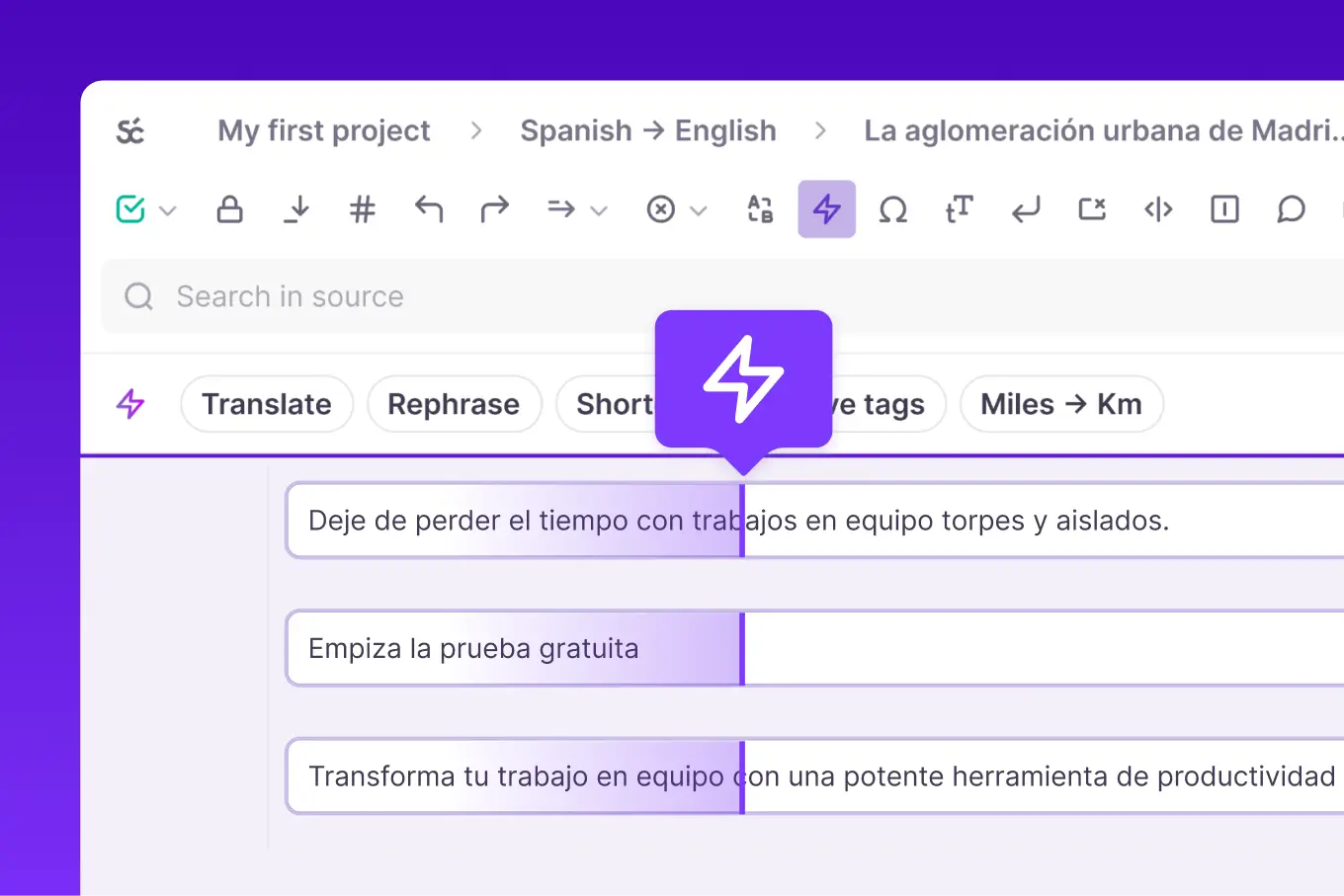
The Smartcat editor in a Spanish to English project: each source string with its translation and AI actions such as Rephrase and Shorten
The Smartcat editor in a Spanish → English project: source on the left, English on the right, one string per row.

Why JSON language files drift apart when each language is translated by hand

JSON language files drift apart when every language is a separate copy of en.json: new keys miss some locales, placeholders get retyped and plurals keep the English shape. Smartcat keeps every language in one project, translated from one source file, so each locale gets the same keys after every sprint.

Before: a file per language, by hand

× every language× every release

With Smartcat: one project

Every language at once

One copy of en.json per language

Each translator gets a file by email and returns it on their own schedule.

One source, every language

All target languages live in one Smartcat project and translate from the same source.

Keys go missing

A key added to en.json last sprint never reaches es.json, so users see English or a raw key.

Only new and changed keys move

Re-import the source and only new or changed strings go to translation and billing.

Placeholders get retyped

A {count} or %s is translated, reordered or deleted, and the string breaks at runtime.

Placeholders locked as tags

Variables stay as protected tags that translators move but can’t edit.

Plurals keep the English shape

Polish needs four forms and Arabic six, but the file only has “one” and “other”.

Plurals per language

Plural segments in the editor or ICU syntax give each language the forms it needs.

  • Valid JSON for every locale

    Every language file loads in your app.

  • The same keys in every language file

    Every locale has the same keys after each sprint.

  • Approved strings reused next release

    Translation memory carries approved strings forward.

JSON language files by locale: naming, plural forms and text direction

Each JSON language file needs a locale code your i18n library loads, the plural categories its language uses and a text direction. English uses “one” and “other” and runs left to right; Arabic uses six plural forms and runs right to left. The categories follow the Unicode CLDR rules that i18next, FormatJS and ICU MessageFormat use.

LanguageLocale codes and file namesPlural categoriesText directionWhat to check
Englishen, en-US, en-GBone, otherLeft to rightUS or UK spelling and date formats. Ship en.json as the fallback your library loads when a key is missing.
Spanishes, es-ES, es-419, es-MXone, many, otherLeft to rightSpain or Latin America, and formal or informal address. Strings run longer than English.
Germande, de-DE, de-AT, de-CHone, otherLeft to rightLong compound words can overflow buttons and tabs, so check them in your build. Choose “du” or “Sie” in the glossary.
French and Portuguesefr, fr-CA, pt-BR, pt-PTone, many, otherLeft to rightFrench “one” also covers zero. Brazilian and European Portuguese need separate files.
Polish, Russian, Ukrainianpl, ru, ukone, few, many, otherLeft to rightFour plural forms, so a two-form English plural can’t be copied across.
Japanese, Chinese, Koreanja, zh-Hans, zh-Hant, kootherLeft to rightNo plural forms and no spaces between words. Simplified and Traditional Chinese are separate locales.
Arabicar, ar-SA, ar-EGzero, one, two, few, many, otherRight to leftSix plural forms. Your app sets the direction; check mixed Latin text and numbers in the build.
Hebrewhe (older systems: iw)one, two, otherRight to leftSame RTL checks as Arabic. Some Java and Android setups still expect the legacy iw code.

File names follow your i18n library: en.json, locales/en/translation.json (i18next) or en-US.json. Hyphenated BCP 47 tags are standard on the web; Java and some mobile stacks use underscores, as in en_US. Smartcat exports one file per language with a file name template, so match the template to the codes your app loads.

How to translate JSON files to English or any other language

To translate a JSON language file to English, create a Smartcat project with the file’s language as the source and English as the target, import the file or keys, let AI translate and reviewers approve, then export one JSON file per language. The same four steps work for Spanish, German, Japanese or Arabic. For a single file, see how to translate a JSON file with Smartcat.

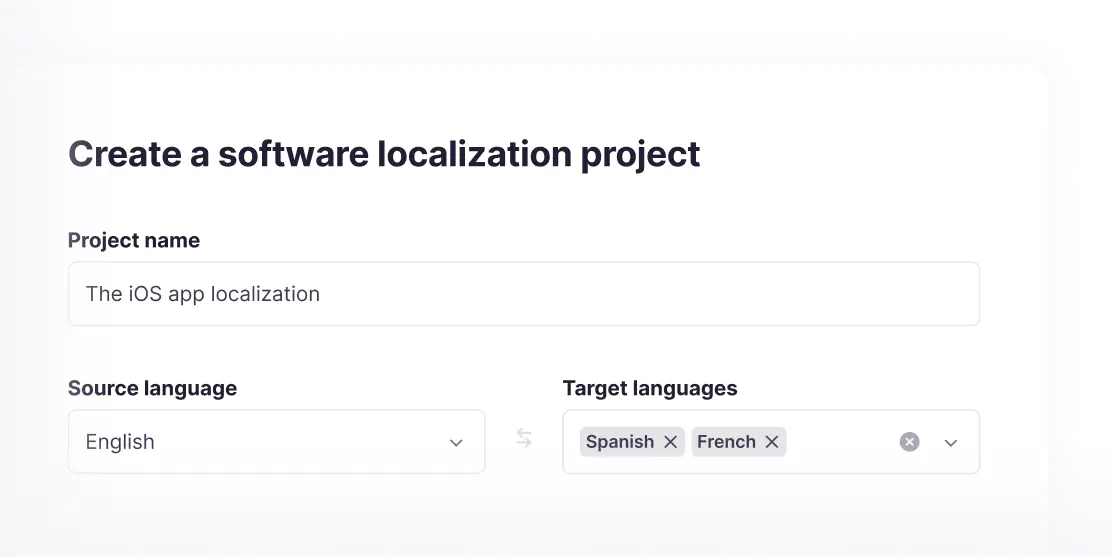
  1. Create a project and pick your languages

    Choose the language your JSON is written in, such as Spanish or English, and add every target language. You can add target languages at any time.

    Create a software localization project in Smartcat with English as the source and Spanish and French as targets
  2. Import your JSON language file or keys

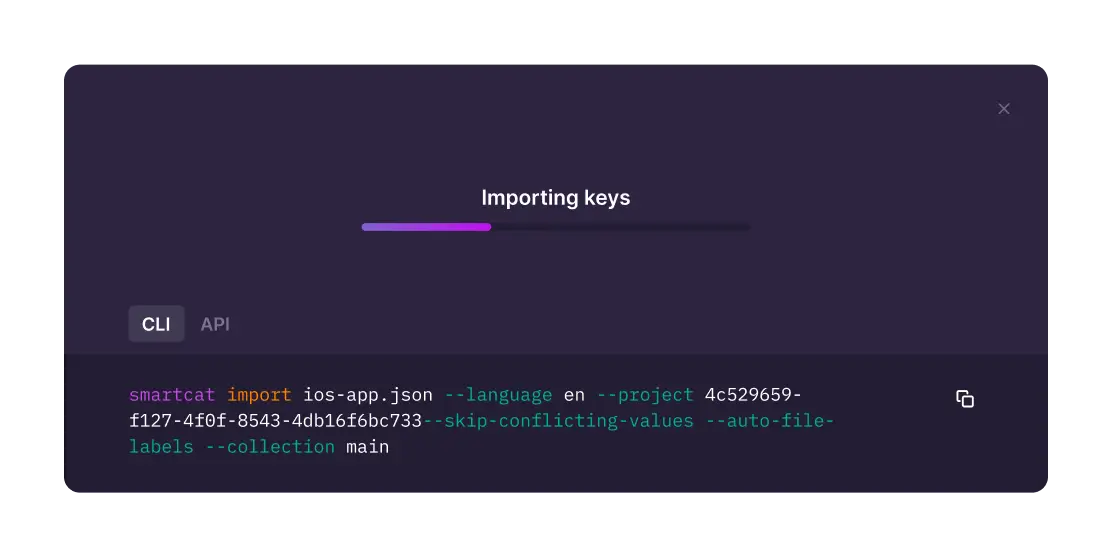
    Upload the file in the browser, or import keys with the CLI or REST API from your build pipeline. Nested keys import with a path separator, so the structure survives.

    Importing keys from ios-app.json into Smartcat with the CLI
  3. Auto-translate JSON with AI, then review each language

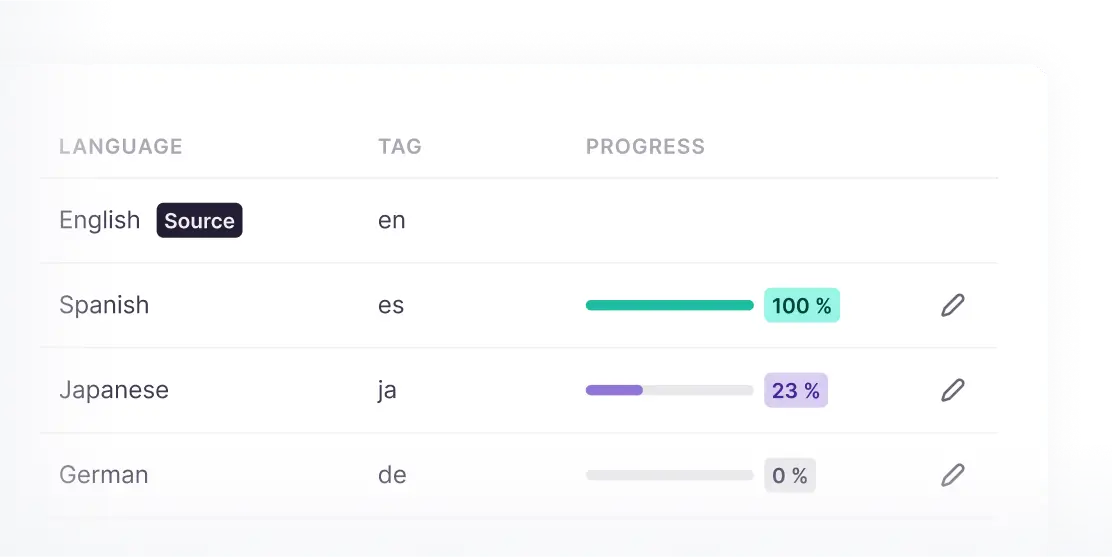
    AI translates every language with your glossary and translation memory. Your reviewers or Smartcat linguists approve each language, and progress shows per locale.

    Language progress in Smartcat: Spanish 100%, Japanese 23%, German 0%
  4. Export one JSON file per language

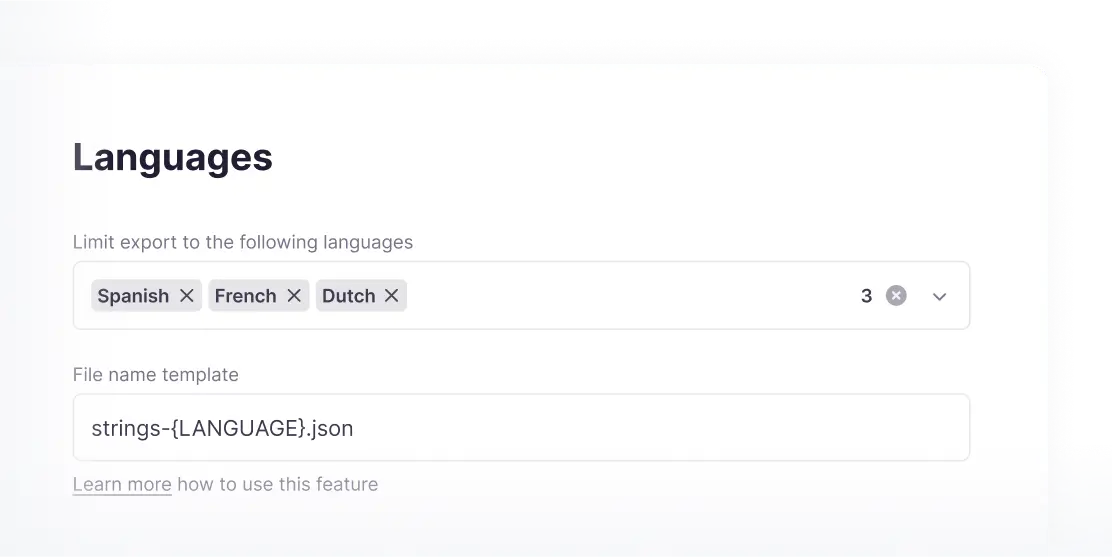
    Download flat or structured JSON for every language, named by a template such as strings-{LANGUAGE}.json, or pull the files back through the API.

    Export settings in Smartcat with Spanish, French and Dutch and the file name template strings-{LANGUAGE}.json

See how Smartcat translates your own JSON locale files

Multi-language JSON translation in one Smartcat project

Smartcat translates one JSON source file into every target language in a single project: AI translates with your glossary, reviewers approve, QA checks catch broken placeholders, and each language exports as its own file. Book a demo to see it on your own files.

What changes when you translate JSON to Spanish, German, Japanese or Arabic

Translating JSON to Spanish, German, Japanese or Arabic follows the same steps in Smartcat. What changes per language is the locale code, the number of plural forms, how much longer strings run and, for Arabic and Hebrew, the text direction. The cards below group the languages by what you need to check.

Into English

JSON written in another language, translated into the English your app falls back to.

Translate JSON strings from Spanish, German or Japanese to English

Set the language your file is written in as the project source and English as the target. Keys stay untouched, and only values are translated.

  • es.json
    Spanish source
  • en.json
    English output, same keys

en, en-US or en-GB: pick the English your app loads

Most apps ship one en.json as the fallback. Add en-GB only if UK spelling and dates matter to your users.

Common English codes

enen-USen-GB

Spanish, German, French and Portuguese

Longer strings, regional variants and formal address.

Spanish, Portuguese and French variants are separate files

Spain and Latin America, Brazil and Portugal, France and Canada each get their own locale. Add each one as its own target language in the project.

  • es-ESes-419
    Spanish
  • pt-BRpt-PT
    Portuguese
  • frfr-CA
    French

German and French run longer than English

Translated strings often need more room than the English source. Reviewers see each full string in the editor; check buttons and tabs in your build before release.

English
Save
German
Speichern

Polish, Russian, Ukrainian and Arabic plurals

More plural forms than English has.

JSON plural forms for Polish, Russian and Arabic

English needs two plural forms, Polish four and Arabic six. Translate plurals as plural segments in the editor or as ICU MessageFormat strings; on export they come back as ICU-compatible strings.

  • en
    one, other
  • plruuk
    one, few, many, other
  • ar
    zero, one, two, few, many, other

Japanese, Chinese and Korean

No plurals, no spaces, two Chinese scripts.

Japanese and Korean JSON: one form for every count

Japanese, Chinese and Korean use a single “other” form, so a plural string becomes one translation per key.

Locale codes

jakozh-Hanszh-Hant

Translate JSON to Simplified or Traditional Chinese

Mainland China uses Simplified Chinese; Taiwan and Hong Kong use Traditional. They are separate target languages with separate files.

  • zh-Hanszh-CN
    Simplified
  • zh-Hantzh-TW
    Traditional

Right-to-left: Arabic and Hebrew

The JSON stays the same. Direction lives in your app.

Translate JSON to Arabic or Hebrew: text stays in reading order

Arabic and Hebrew values sit in the JSON in logical order, like any other string. Your app sets dir="rtl" for the locale, and the browser or OS draws the text right to left.

Smartcat translates the strings; mirroring the layout is a job for your app and your RTL test pass.

Check mixed text and placeholders in RTL strings

Brand names, numbers and placeholders inside an RTL sentence can appear in an unexpected position. Reviewers check the string in the editor, and you check the screen in your build.

Check in the RTL build

  • Latin brand names inside Arabic text
  • Numbers and {placeholders}
  • Punctuation at the end of a string

The AI coworkers that translate and check your JSON files

Connect your Git repository, CLI and API to translate JSON locale files

Pull locale files from GitHub, GitLab or Bitbucket, or script imports with the REST API and CLI. See all integrations

JSON localization results: Huel, Babbel and Kaseya

Product teams at Huel, Babbel and Kaseya translate locale files and product copy in Smartcat. Each figure links to its case study.

21 wk

of manual work eliminated a year

Huel eliminates 21 weeks of manual work a year with Smartcat automation across its website, CRM and marketing content.

31 h

saved every month

Babbel saves 31 hours of manual work every month with Smartcat.

70%

lower localization costs

Kaseya cut localization costs by 70% and reinvested the savings in more languages.

“We’ve improved quality with custom prompts per language, and by actively managing TM and a large glossary (~500 entries).”
Magdalena Tumulka
Magdalena TumulkaLocalization Manager, Huel

See your JSON files in every language you ship

What product and localization teams say on G2

What developers ask before they move JSON locale files to Smartcat

Developers ask four things before they move JSON locale files to Smartcat: whether keys change, whether already translated strings are billed again, who reviews each language, and whether Smartcat handles right-to-left layout. The short answers are below; the FAQ further down has the detail.

“Will Smartcat rename or reorder my keys?”

No. Only values are translated. Keys, nesting and file structure come back as they went in, as flat or structured JSON.

“Do we pay again for strings we already translated?”

No. Only new and changed strings are billed. Approved translations are reused from your translation memory every release.

“Can our own translators review some languages?”

Yes. Invite your reviewers to the languages they know, or hire linguists from the Smartcat marketplace for the rest.

“Will Smartcat make our app right-to-left?”

No. Smartcat translates the Arabic and Hebrew strings; your app sets the direction and mirrors the layout. Plan an RTL test pass in your build.

How Smartcat protects the JSON locale files you translate

Locale files often hold strings for features you haven’t released yet. Smartcat protects them at every step: SOC 2 Type II and ISO 27001 certification, role-based access and no training of public AI models on your content. Details are on the Smartcat security page.

SOC 2 Type II compliant

Smartcat is SOC 2 Type II compliant and isolates every workspace.

ISO 27001 certified

Smartcat is an ISO 27001 certified organization.

Role-based access controls

Set who can view, translate, review and approve each project on enterprise plans.

Never used to train public AI models

Your strings and source files are never used to train public AI models.

Encrypted in transit and at rest

Files and translation memory are encrypted in transit and at rest.

Deletion on request

Content is deleted or returned within 30 days of a written request.

Resources for JSON localization

Translate JSON to English and other languages: FAQ

How do I translate a JSON file to English?

Upload the JSON file to Smartcat, set the language it is written in as the source and English as the target. Smartcat translates only the values with AI, keeps every key and placeholder, and lets a reviewer approve the English before you export a valid en.json. You can also import keys through the CLI or REST API, or translate a JSON file online for free first.

What is the best way to translate JSON into multiple languages?

Smartcat’s JSON translator translates one JSON source into every target language in one project. Whichever tool you test, check that it leaves keys untouched, protects placeholders, handles each language’s plural forms, reuses approved translations and exports one valid file per language through an API. Smartcat is not the best fit if you translate one small file once; a simple online converter is enough for that.

How do I translate a JSON file from English to Spanish?

Create a Smartcat project with English as the source and Spanish as the target, choosing es, es-ES or es-419 to match your app. Smartcat translates the values with AI and your glossary, a reviewer settles formal or informal address, and you export es.json with the same keys and the plural forms Spanish needs.

Why does Google Translate break JSON language files?

Google Translate treats a JSON file as plain text, while Smartcat and other localization tools parse it. Pasting a file risks translated keys, broken quotes and changed placeholders, and translating values one by one loses context and consistency. A parser that translates only the values, with your glossary and translation memory, gives you a file your app can load.

How should I name a JSON language file?

Name it with the locale code your i18n library loads. In Smartcat you set a file name template, so exports follow your convention. Common patterns are en.json and es.json, locales/es/translation.json for i18next, or region tags such as es-MX.json. Web stacks use hyphenated BCP 47 tags; Java and some mobile stacks expect underscores, as in es_MX.

How accurate is AI translation of JSON text to English?

92% of words translated by Smartcat AI are accepted without a single human edit. Smartcat translates JSON text with your glossary and translation memory, so product terms stay consistent across languages. Tone, formal or informal address and short UI labels with no context still need a reviewer, so keep human review on for customer-facing languages.

How does Smartcat handle plural forms in different languages?

Smartcat translates plurals in two ways: as plural segments in the editor or as ICU MessageFormat strings, and on export plurals come back as ICU-compatible strings. That matters because languages need different forms: English has one and other, Polish adds few and many, Arabic uses six forms, and Japanese uses a single form.

Can I translate JSON into Arabic, Hebrew and other right-to-left languages?

Yes. Smartcat translates JSON into Arabic, Hebrew and other right-to-left languages like any other target language. The values are stored in reading order, and your app sets the text direction, for example with dir="rtl". Plan a test pass in your build to check layout mirroring, numbers and Latin brand names inside RTL strings.

Can I translate JSON strings from Japanese, Chinese or Spanish to English?

Yes. Smartcat lets any supported language be the source of a project, so Japanese, Chinese or Spanish JSON strings translate into English the same way English strings translate out. Each project has one source language; if your files come in several source languages, create one project per source language.

Can I translate one JSON file into several languages at once?

Yes. Add every target language to one Smartcat project and the same JSON source is translated into all of them in parallel, with a task per language. You can add target languages at any time, review each language separately and export one file per language, or every language in one download.

What happens when I add new keys to the source file?

Re-import the source file or keys, and Smartcat sends only new and changed strings to translation. Approved translations are reused from your translation memory, and only new and changed strings are billed. Every language file gets the new keys, so locales don’t fall out of step with your source after each sprint.

Does Smartcat work with i18next and React Native JSON files?

Yes. Smartcat imports JSON locale files from i18next, React Native and other JavaScript i18n libraries, including nested keys through structured JSON with a path separator. It also handles YAML, Android XML and iOS .strings in software localization projects, so web and mobile strings can share one glossary and translation memory.

Didn’t find your answer? Talk to a localization specialist

Trademark notice. Smartcat is an independent platform and is not affiliated with, endorsed by, sponsored by, or otherwise associated with Google LLC. Google Translate is a trademark of Google LLC. All product names, logos, and trademarks referenced on this page are the property of their respective owners and are used for identification and descriptive purposes only.

Translate JSON to English and every language your users speak

See Smartcat translate one of your own JSON locale files, from import to one file per language, or start a 15-day free trial with 15,000 Smartwords and no credit card.