GDPR-compliant organization

ISO 27001 certified organization

SOC II compliant organization

Machine translation software with the best engine for each language pair

Smartcat runs machine translation for localization and content teams that translate many files into many languages, across several engines and large language models. You choose the engine for each language pair, and a fallback reruns the job if it fails. Your glossary and translation memory apply to every job, and a quality score on each segment tells reviewers what to edit and what to publish.

92% of words translated by Smartcat AI are accepted without a single human edit.

Book a demo

Book a demo

A 1:1 walkthrough with a Smartcat specialist

More than 80 of the world’s largest companies have chosen Smartcat

What is machine translation software?

Machine translation software, also called automated translation software, is a tool that translates text from one language into another automatically. The engine behind it is almost always neural machine translation (NMT) or a large language model (LLM). Automatic translation drafts fast, but a bare engine can’t tell you which of its sentences are wrong.

A machine translation platform such as Smartcat adds what the engine lacks: an engine per language pair, your glossary and translation memory on every job, a quality score for each segment and a review step. No engine wins on every pair, so switching one in Smartcat is a setting, not a migration. New to the topic? Read what machine translation is and how it works.

92%

words accepted without an edit

92% of words translated by Smartcat AI are accepted without a single human edit.

280+

languages

Translate into 280+ languages, each pair routed to the engine you choose.

80+

file formats

Translate 80+ file formats, from InDesign and PDF to SCORM courses and video.

How do you choose a machine translation engine for each language pair?

In Smartcat, an AI Translation Profile sets the machine translation engine for each language pair, the order to try engines in and a fallback that reruns the job if the first engine fails. A profile can also switch AI translation off for content that needs a human translator.

Language pair or workflowEngineIf the engine fails
English → GermanAn LLM engine, with formal “Sie” set in the Translator’s system promptFallback engine reruns the job
English → JapaneseA neural MT engineFallback engine reruns the job
English → FinnishThe engine your reviewers scored best on your contentFallback engine reruns the job
Contracts, any pairAI translation switched off: human translation onlyNot needed

Profiles also decide which translation memories and glossaries apply. Create one per client, department, brand or use case; a change of engine applies to projects created after it. Details: AI Translation Profiles.

Why does raw machine translation still need so much fixing?

Raw machine translation needs fixing because of what surrounds the engine: the wrong engine for a language pair, terms that drift, the same fix made twice and no way to tell which segments are safe to publish.

Raw machine translation

× every file× every language

Machine translation in Smartcat

Measured, then reviewed

One engine for every language pair

The engine that suits your German marketing copy also gets your Japanese support articles.

An engine per language pair

An AI Translation Profile sets the engine for each pair, with a fallback if it fails.

Terminology drifts between files

The same product name comes back three ways in three documents, and a reviewer in-market finds it.

Your terms in the first draft

Glossary terms, Do Not Translate entries and translation memory apply before review.

The same correction, five times

A fix made in one project doesn’t reach the next, so reviewers re-edit the same sentence.

Every approved edit is kept

Approved segments go into translation memory, so the next file starts from them.

Quality found out late

Without a measure, a weak language pair shows up in review, or after publication.

A score on every segment

Translation Quality Score rates each AI-translated segment as the draft is made.

Nobody knows what is safe to ship raw

Teams review everything, or nothing, because they can’t tell the difference.

Review only what needs it

Segments above the score threshold can be confirmed; the rest go to a reviewer.

Which type of machine translation engine should you use?

Use a neural machine translation (NMT) engine for high-volume, factual content, and a large language model (LLM) when terminology, tone or formality matter. Rule-based and statistical engines shaped machine translation but are rarely used today. Smartcat lets you pick NMT or LLM machine translation engines pair by pair.

TypeHow it worksStrongest atWhere it breaksIn Smartcat
Rule-based (RBMT)Hand-written grammar rules and dictionariesNarrow, controlled domains with fixed terminologyCan’t generalise beyond its rules; output is rigid—
Statistical (SMT)Learns word and phrase probabilities from bilingual corporaBroad coverage where data existsOptimises fragments, so sentences read disjointed—
Neural (NMT)Encodes the whole sentence, then generates the targetGeneral-purpose translation; what “machine translation” means todayQuality swings by language pair; confident-sounding errorsGoogle NMT, DeepL, Microsoft Translator
Large language model (LLM)Adds context, your glossary and instructions to the model’s inputTerminology, tone and formality you set in a promptSlower and costlier per word than raw NMTOpenAI GPT, Gemini, Anthropic models

Formality instructions work only with LLM engines; neural MT engines can’t take them. Google NMT is the fallback engine. Engine lists change, so check the help center for the current set. Product names belong to their owners; see the trademark notice below the FAQ.

Machine translation vs CAT tool vs TMS: what’s the difference?

The difference between machine translation and a CAT tool is who does the work. Machine translation is the engine that drafts a translation. A CAT (computer-assisted translation) tool is the workspace where a person checks and corrects that draft, with translation memory, glossaries and QA checks. A TMS (translation management system) runs the work around the files: tasks, deadlines, approvals and reports. They are layers, not alternatives.

In Smartcat the three are one platform. Machine translation output opens in the Smartcat Editor, the CAT tool, with your terms applied, inside projects you manage in the same workspace as a translation management system.

What it isWhat it doesWho uses it
Machine translationAn engine that translates automaticallyProduces a first draft at any volumeAnyone who needs speed or volume
CAT toolThe workspace a translator or reviewer works inSegments files, applies translation memory and glossaries, runs QA, tracks changesTranslators and reviewers post-editing machine translation
TMSThe system that manages the work around the filesAssigns tasks, tracks deadlines, routes approvals, reportsLocalization managers running many projects

How to run machine translation software in Smartcat in five steps

To machine translate content in Smartcat, set the engines once in an AI Translation Profile, upload your files, run machine translation, check the quality scores and export. Every project after the first follows the same profile.

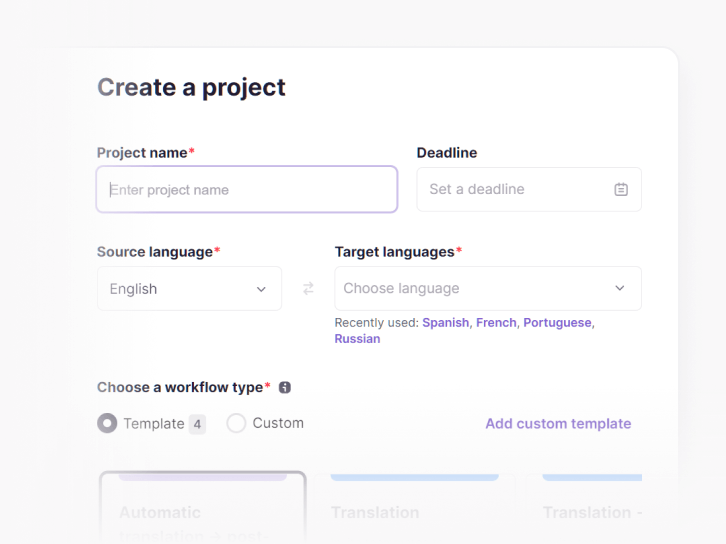
  1. Create a project with an AI profile

    Name the project, pick the source and target languages, and choose the AI Translation Profile that sets the engine per pair and the memories and glossaries to apply.

    Creating a project in Smartcat machine translation software: project name, source language and target languages
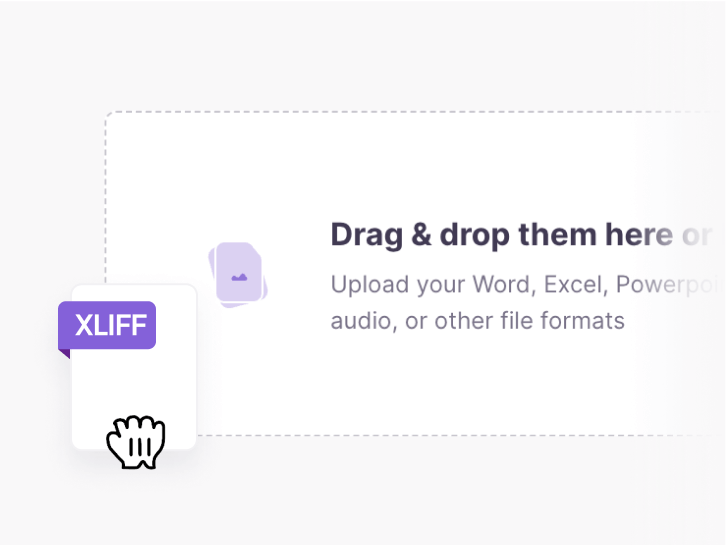
  2. Add your content

    Upload files in any of 80+ formats, or bring content in from a connected tool. Several files can share one project, one glossary and one memory.

    Drag-and-drop upload area in Smartcat with an XLIFF file being added
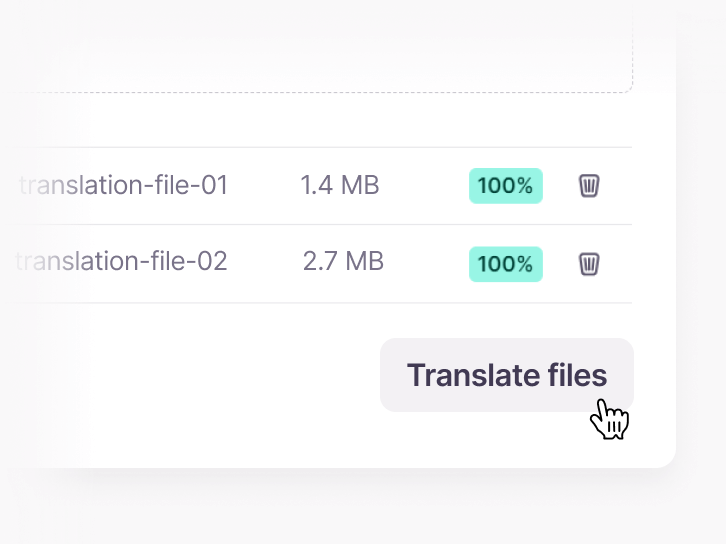
  3. Run machine translation

    Translation memory matches go in first; the engine translates the rest with your glossary applied. If the engine fails, the fallback reruns the job.

    Two uploaded files ready in Smartcat with the Translate files button
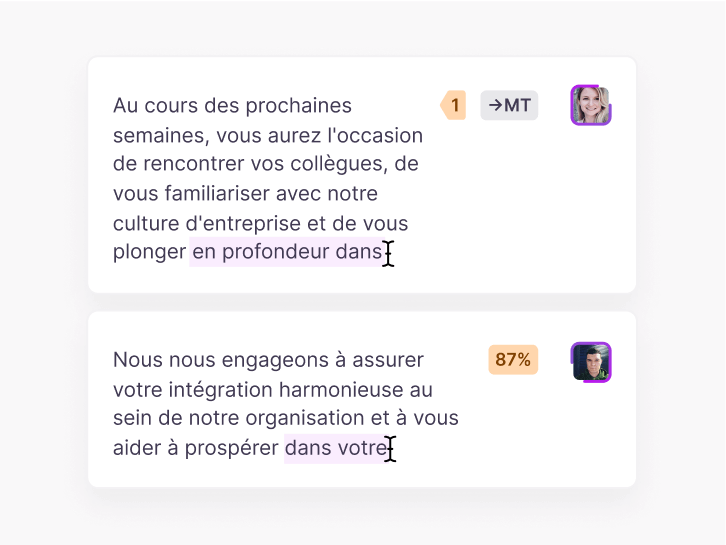
  4. Check scores and post-edit

    Each AI-translated segment gets a quality score. Confirm the strong ones in the Smartcat Editor, the CAT tool, and send the weak ones to your reviewer or a Marketplace post-editor.

    Smartcat editor with machine-translated French segments and their match scores
  5. Export, and keep what you approved

    Download each language in the original format. Every approved segment stays in translation memory for the next job.

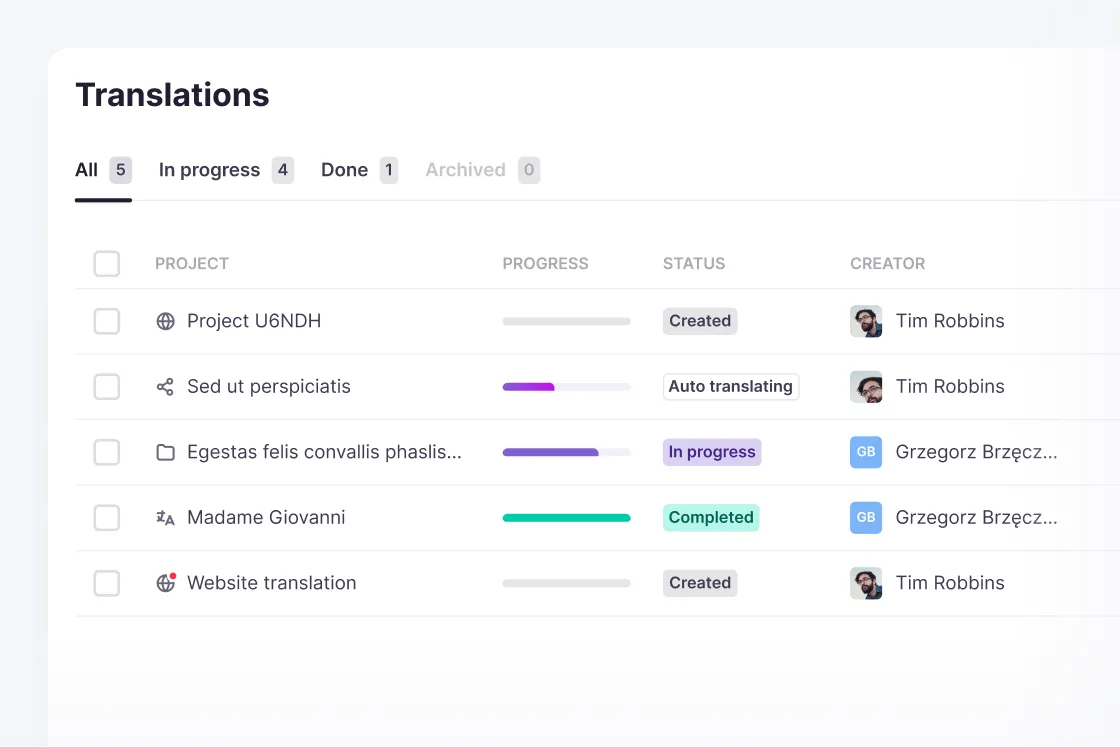
    Smartcat project list with projects created, auto translating, in progress and completed

Bring your own content and language pairs to a demo

What features should machine translation software have?

Machine translation software should let you choose engines per language pair, score every segment, apply your terminology, run QA checks, protect placeholders and send weak segments to post-editing. The Smartcat machine translation platform does all six.

See your own language pairs routed and scored

Which content can you machine translate, and where does it need a person?

Machine translation works best on factual, high-volume content in high-resource language pairs, and needs a person for brand voice, regulated text and low-resource pairs. The cards below go through it by content type, language and workflow.

Content types

Marketing copy and idioms

Marketing copy is where machine translation fails most visibly: idioms, wordplay and taglines come out literal. Use it for a draft and a cost baseline, then budget a human pass for anything in the brand voice.

Usually survives
  • Product descriptions
  • Feature copy
Usually needs a person
  • Headlines
  • Campaign lines

Legal and medical terminology

Legal and medical content can be machine translated, but an error costs far more than a review. Lock terms in a glossary before the first run and have a qualified reviewer sign off. Smith+Nephew cut reviewers’ editing workload by 70% this way.

  1. Glossary firstterms locked
  2. Machine translationwith the glossary
  3. Expert sign-offbefore publishing

UI strings and placeholders

Software strings break machine translation in two ways: placeholders like %s or {count} get moved or translated, and short strings arrive without context, so “Open” can become a verb or an adjective. Define custom placeholders and check every one is in the target.

  • %s{count}
    Kept as placeholders, never translated
  • Open
    Needs context: verb or adjective?

Brand names, numbers and tables

Set brand names, product names and model numbers to Do Not Translate in the glossary before any run. Then watch numbers and tables: decimal separators, date order and units differ by locale, and text that fitted a column in English may not after translation.

Before you publish

  • Brand and product names: Do Not Translate
  • Decimal separators and dates: check per locale
  • Table cells: check for overflow

Languages and scripts

English into German, French, Spanish, Italian and Dutch

These pairs have the most training data, so raw output is often publishable for factual content after a light check. German and French also need a formality choice, du or Sie, tu or vous, set in the Translator’s system prompt; that works with LLM engines only.

High-resource pairs from English

GermanFrenchSpanishItalianDutch

Low-resource language pairs

Low-resource pairs, and any pair translated through English as a pivot, degrade noticeably: more drift, more literal renderings, more sentences that are grammatical but wrong. Treat post-editing as required here, and build translation memory early.

On these pairs, your own approved sentences improve output more than the choice of engine does.

Japanese, Chinese and Korean

These scripts need care beyond translation quality. Words aren’t separated by spaces, so segmentation and line breaks differ, and specialised fonts may be substituted on export. Check the output against your brand fonts.

Check segmentation and fonts

JapaneseChineseKorean

Arabic and Hebrew

Arabic, Hebrew, Persian and Urdu are supported languages. In image translation, right-to-left text is re-rendered in the correct direction, including Latin product names inside an RTL sentence. Review layouts, alignment and punctuation in exported documents.

Right-to-left languages

ArabicHebrewPersianUrdu

Workflows

Document machine translation

Run machine translation on the files you already have, from Word, PowerPoint and Excel to PDF and XLIFF, and download each in its original format. Scanned PDFs go through OCR first. PPTX speaker notes are translated only when “Load notes” is on at upload.

  • DOCXPPTXXLSX
    Same format back
  • PDF
    Scans read with OCR
  • PPTX notes
    Only with “Load notes”

Machine translation API

A machine translation API handles content that never becomes a file: UI strings, product data, help articles in a CMS. Send it through the Smartcat translation API for translation automation, and get translations back into your own systems with the same glossaries and memories as your file projects.

Website machine translation

Website machine translation runs through the Smartcat website translator, so pages, navigation and metadata reach every language without exporting them by hand. Review the pages that carry claims or legal text before they go live, as you would any machine-translated file.

Where the human pass fits

Post-editing is a decision per project, not a fixed stage. Internal documentation and high-volume product data often ship raw; anything carrying a claim, a regulation or the brand voice goes to machine translation post-editing (MTPE).

The AI coworkers behind the work

Each coworker handles one step, from the machine-translated draft to the final check. Your reviewers approve every language before it is published.

Which tools can you connect to machine translation?

Smartcat connects machine translation to Google Drive, Docs and Sheets, Microsoft Teams, Figma, Contentful, Zendesk, ServiceNow, WordPress and Sitecore, so content is translated where your teams keep it. See all integrations

What results do teams get from machine translation in Smartcat?

Smith+Nephew reviewers edit 70% less, Stanley Black & Decker cut translation costs by up to 70%, and Topcon replaced about eight translation companies with one platform. Each figure comes from that customer’s own case study.

4x

faster turnaround

Smith+Nephew cut turnaround from a 10‑day agency SLA to two to three days.

70%

lower translation costs

Stanley Black & Decker cut translation costs by up to 70%.

8→1

translation vendors consolidated

Topcon moved from about eight translation companies to one platform and one process on Smartcat.

70%

less editing for reviewers

“Our reviewers compared our legacy content done by translation agencies with content produced by my team with Smartcat AI translation. The number of corrections is now much lower and the editing process is faster and less labor-intensive as a result.”

Smith+Nephew translates life-science and medical content with Smartcat AI, translation memory and glossaries, and its reviewers still sign off.

Smith+Nephew case study
Barbara Fedorowicz
Barbara FedorowiczTranslation department manager, Smith+Nephew
Stanley Black & Decker

$1.20

per 1,000 words, down from $200–$300

“Smartcat’s AI translation is a fantastic tool. Our ability to source content from a central repository and benefit from adaptive algorithms which incorporate translation memories and glossaries across all project teams means the business as a whole gains from each team’s translations.”
Stanley Black & Decker case study
Senior ManagerStanley Black & Decker

Find out which of your content is safe to publish raw

What translators and localization teams say on G2

What do teams ask before moving machine translation to Smartcat?

“We can paste text into a free machine translation tool.”

For one paragraph you need to understand, do that: it is faster. Smartcat is for translation as a repeated process, with many files, many languages and terms that must stay consistent.

Free text-box translator
  • One paragraph at a time
  • No glossary or memory
  • No review step
Smartcat
  • Whole files and projects
  • Glossary and translation memory
  • Scores and reviewers

“Why not keep the engine we already use?”

One engine is a bet that one vendor is best for every language pair and content type you publish. Routing removes the bet, and switching is a setting in a profile.

  1. Pick per pairin the profile
  2. Fallback onif the engine fails
  3. Compare scoresper language pair

“What will it cost?”

Smartcat meters Smartwords: one per source word per target language, not per file or per page. Reuse lowers the bill over time; the FAQ below shows how translation memory matches are counted.

Enable only the machine translation engines you use: with several engines on one project, each engine’s translation draws Smartwords (help center, Understanding Smartwords).

“Can every engine follow our formality rules?”

No, and this is a real limit. Formality is set in the Translator’s system prompt, which works with LLM engines only. Neural MT engines can’t take a formality instruction, so route du/Sie or tu/vous pairs to an LLM engine.

LLM engines
  • Follow a formality instruction
Neural MT engines
  • No custom prompt instructions

How does Smartcat keep machine-translated content confidential?

Smartcat is SOC 2 Type II compliant and ISO 27001 certified, encrypts content in transit and at rest, and never uses it to train public AI models. Free consumer translators may keep what you paste in. Details are on the Smartcat security page.

Role-based access controls

Set who can view, translate, review and approve content by team, role or region on enterprise plans.

Single sign-on (SSO)

Corporate customers sign in through their identity provider: Azure AD, Okta or ADFS.

SOC 2 Type II and ISO 27001

Smartcat is SOC 2 Type II compliant, ISO 27001 certified and isolates every workspace.

Never used to train public AI models

The content you machine translate is never used to train public AI models.

Deletion under the DPA

Under the Data Processing Agreement, your content is destroyed or returned within 30 days of a written request.

Encryption in transit and at rest

Content is encrypted in transit and at rest, in a workspace no other account can reach.

Where can you learn more about machine translation and post-editing?

Three Smartcat blog guides: how machine translation works, when machine translation post-editing pays off, and where AI translation is enough without a human translator.

Frequently asked questions about machine translation

What is the best machine translation software?

The best machine translation software fits your language pairs, formats and quality bar; no single engine wins everywhere. Smartcat suits teams that translate many files into many languages, because it routes each pair to its own engine. When you compare machine translation tools, check engine choice, glossary and translation memory support, a quality score per segment and a review step. For one-off paragraphs, a free translator is better.

Is there free machine translation software?

Yes. Free engines such as Google Translate and DeepL’s free tier translate text with limits on volume and confidentiality, and you get one engine’s output with no quality score. Smartcat has a free trial rather than a free plan: 15 days and 15,000 Smartwords, no credit card. Use it to compare engines on your own language pairs and see which segments score high enough to publish.

How do I machine translate a document?

Upload the file to Smartcat, choose the source and target languages, and the AI Translation Profile decides which engine handles each pair. Your glossary and translation memory apply first, then you review the draft in the editor, a CAT tool, and download it in its original format. For format-by-format help, see document translation.

How accurate is machine translation?

Accuracy depends on the language pair, the content type and how much of your own data the engine can use, so one number misleads. In Smartcat, 92% of words translated by Smartcat AI are accepted without a single human edit. Output is strongest on high-resource languages and factual text, and weakest on idioms and strings without context. Translation Quality Score then rates each segment of your file.

Can machine translation be published without human review?

Some of it can, and Smartcat shows you which. Translation Quality Score rates every AI-translated segment: segments above the threshold can be confirmed as they are, and the rest go to your reviewer or a Marketplace specialist. Anything regulated or legally binding still deserves a human read, whatever its score. More in the TQS guide.

Is machine translation safe for confidential content?

It depends on the provider. Free consumer tools may keep what you paste in, which is why many legal and security teams rule them out. Smartcat is SOC 2 Type II compliant and ISO 27001 certified, encrypts content in transit and at rest, isolates every workspace and grants access by user role. Your content is never used to train public AI models.

How much do machine translation services cost?

It depends on who you pay. Smartcat meters Smartwords, one per source word per target language, and charges no per-file or per-page fee. Engine APIs usually bill per character; agencies bill per word, often with minimum fees. The bigger lever is reuse: content you have translated before should not cost full price again. See pricing.

How does neural machine translation work?

Neural machine translation, one of the two engine types you can choose in Smartcat, encodes a whole sentence and then generates the target sentence, so word order and agreement hold together. Quality comes from the training data, which is why one engine can be strong on English to German and weak on English to Finnish. Smartcat adds your glossary and past translations to that input.

What is translation automation?

Translation automation means content moves from source to published translation with as few manual steps as possible. In Smartcat, an AI Translation Profile picks the engine for each language pair, connectors and the API pull content in, segments above the quality score threshold can be confirmed automatically, and only new or changed text is re-translated when the source updates. People step in where the score is low.

Which machine translation engines does Smartcat support?

Smartcat supports neural MT engines, including Google NMT, DeepL and Microsoft Translator, and LLM engines from OpenAI, Gemini and Anthropic. You choose the engine for each language pair in an AI Translation Profile, add several in priority order, and keep a fallback on: if the primary engine fails, Smartcat reruns the job with Google NMT. The current list is in the help center.

Can I train machine translation on my own glossary?

Yes. In Smartcat, your glossary and translation memory apply before and during machine translation, so approved terms and sentences come through instead of being guessed again. Terms marked Do Not Translate stay as they are. Every edit a reviewer approves is written back, which is why output improves with use and why two teams on the same engine get different quality.

Can I keep separate translation memories and glossaries for each client?

Yes. In Smartcat, create an AI Translation Profile for each client, department or brand, give it only the memories and glossaries it should use, and apply it when you create projects. By default, new translation memories are added to every profile, so switch that off if clients must stay separate. Profiles belong to one workspace and can’t be shared across workspaces.

Does Smartcat provide machine translation services, or only software?

Both. Smartcat is the software that runs machine translation with your engines, glossaries and translation memory. For the human side, you can hire vetted linguists and post-editors from the Smartcat Marketplace in the same workspace, or buy MT post-editing services. Most teams combine the two: machine translation for volume, people for whatever carries risk.

Is there a machine translation API?

Yes. Smartcat has a translation API for content that never becomes a file, such as UI strings, product data and CMS articles. Your systems send the text and receive the translations back, and the glossaries and translation memory in your workspace apply as they do for files. See the translation API for details and the integrations that need no code.

Do I pay again to re-translate content I’ve already translated?

No, not for exact repeats. On Smartcat’s current plans, translation memory matches of 100% or higher use no Smartwords, and repetitions, including those across files, don’t draw from your balance. Fuzzy matches below 100% still use one Smartword per source word. That is why cost per word falls as your translation memory grows.

Didn’t find your answer? Book a demo with a machine translation specialist

Last updated: 30 October 2026

Trademark notice. Smartcat is an independent platform and is not affiliated with, endorsed by, sponsored by, or otherwise associated with Google LLC, DeepL SE, Microsoft Corporation, OpenAI or Anthropic.

Google Translate™, Google NMT and Gemini are trademarks of Google LLC; DeepL is a trademark of DeepL SE; Microsoft® Translator is a trademark of Microsoft Corporation; OpenAI and GPT are trademarks of OpenAI; Anthropic is a trademark of Anthropic PBC. All product names, logos, and trademarks referenced on this page are the property of their respective owners and are used for identification and descriptive purposes only.

Try machine translation software on your own content

Route each language pair to the right engine, apply your terminology to every job and review only the segments that need it. Book a demo to see it on your own content, or start a 15-day free trial with 15,000 Smartwords and no credit card.