The product ships every sprint, but translation still runs as a separate loop: export strings, email files, fix broken placeholders, re-import, chase review. Every release either waits for translation or ships with untranslated screens.
Continuous localization means new and changed strings move from the code repository to translation and back automatically, as part of the release process. The short answer: connect your repo to a localization platform, translate with AI and review, and reuse what was approved. Smartcat does this through Git, CLI and API integrations.
This guide answers the questions product and engineering teams ask when they set it up: how the loop works, which platforms sync with Git, when to build your own pipeline, and how to keep humans in review. The examples use Smartcat.
Key takeaways
- Automate the loop, not just the translation. Strings should leave and return to the repo through Git, a CLI or an API, not a spreadsheet.
- Context belongs to the key. Smartcat shows translators the key ID and comments for every string.
- AI drafts, people approve. 92% of words translated by Smartcat AI are accepted without a single human edit.
- Pay for change only. Approved strings are reused, so only new and changed strings are billed.
- One platform for UI and docs. Smartcat handles locale files, XML and DITA docs and 80+ file formats in one workspace.
How do you set up continuous localization so new UI strings get translated automatically?
Connect the place your strings live to a localization platform, so new and changed keys flow out to translation and back without anyone exporting a file. In Smartcat that connection is the GitHub, GitLab and Bitbucket integration, the CLI or the REST API, and 92% of words translated by Smartcat AI are accepted without a single human edit.
- Create a software localization project. Smartcat keeps keys in collections; one project can hold several collections, one source language and any number of target languages, which you can add at any time.
- Import keys from the repo. Push JSON, YAML, Android XML, iOS .strings or LocJSON files through the Git integration, the CLI or the REST API, from a developer’s machine or a CI/CD job.
- Add context. Key IDs, comments and, where the format carries them, length limits reach translators with each string.
- Translate and review. AI coworkers translate with your glossary and translation memory; linguists or your own reviewers approve.
- Export back to the repo. Translated files come back in the original format, flat or structured, ready to merge.
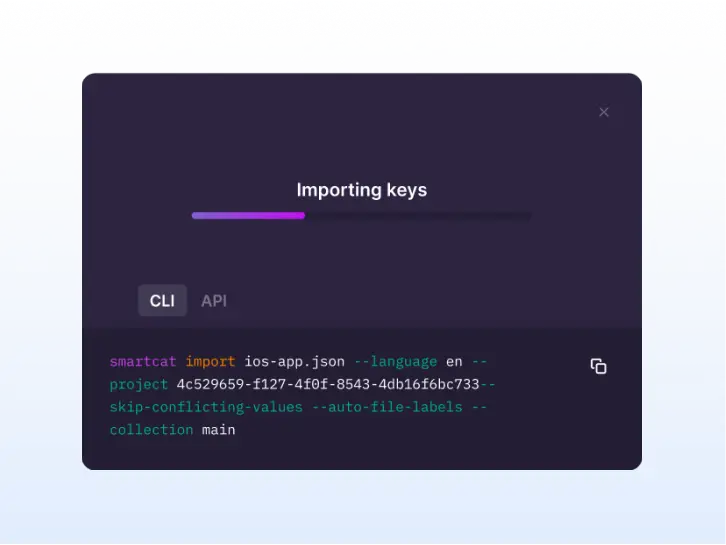
The developer portal documents each call (software localization API, Smartcat CLI), and the help center covers project setup screen by screen.
Our developers copy UI strings into spreadsheets for translators. How can we automate this?
Replace the spreadsheet with a system-to-system loop: strings leave the repo as keys and come back as files. Smartcat imports and exports keys through the UI, REST API and CLI, translates them into any of 280+ languages, and bills only new and changed strings, so the copy-paste step disappears.
| Step | Spreadsheet loop | Continuous loop in Smartcat |
|---|---|---|
| Collect strings | A developer copies keys into a sheet | The CI job or Git integration imports changed keys |
| Give context | A “notes” column, often empty | Key IDs, comments and length limits on every string |
| Translate | Email to an agency or freelancer | AI coworkers translate with your glossary and translation memory |
| Protect code | Someone fixes broken placeholders by hand | Placeholders are locked in the editor |
| Return | Paste back, rebuild the locale file | Export the original format, flat or structured |
| Next release | Start again from a new sheet | Approved strings are reused; only changes are translated |
“We’re coding with AI, so we’re releasing product updates every day, a couple times a day. There’s no way to keep up with that. This rate of change is one of the reasons why Smartcat is so necessary.”
Ellen Kelly, Director of Product Documentation, Kaseya
Which localization platforms sync translation files with GitHub or GitLab?
Smartcat connects to GitHub, GitLab and Bitbucket through one integration, pulling source files from the repository and pushing translations back (Git integration). Most developer-focused platforms offer a Git connection, so compare what happens around the sync rather than the sync itself.
- Crowdin syncs repository files and sends translations back as a pull request on a service branch, as of October 2026 (Crowdin Docs: GitHub integration).
- Lokalise pulls translation files from a repository and opens pull requests with the translated files, as of October 2026 (Lokalise Help Center: GitHub).
- Phrase Strings imports source files from a repository and exports translations back as a pull request, as of October 2026 (Phrase: GitHub (Strings)).
What separates them is what happens after the sync: who translates, how reviewers see context, whether approved strings are reused, and whether the same platform handles your help docs and marketing content. Check these before you choose:
- Formats: every locale format in your repo imports and exports without a converter.
- Trigger: a CLI or API call your CI pipeline can run, not only a manual button.
- Translation: AI plus human review in the same tool, with glossary and memory applied.
- Billing: repeated and unchanged strings shouldn’t cost twice.
Should you build your own translation pipeline on an LLM API or use a localization platform?
Build on an LLM or MT API if you only need raw machine output; use a platform once you need review, memory and file formats handled for you. Smartcat sits on the platform side, with a REST API that applies your translation memory, glossaries and review steps, and AI translation across 280+ languages.
| Your own LLM or MT script | Localization platform (Smartcat) | |
|---|---|---|
| Placeholders and markup | Your code must protect them | Locked by the file parser |
| Glossary | Available on some MT APIs, such as Google Cloud Translation Advanced (Google Cloud Translation: Creating and using glossaries (Advanced)) | Applied to every string, every language |
| Approved translations | Lost unless you build a store | Saved to translation memory and reused |
| Human review | Spreadsheets or pull requests | Reviewers in an editor with context |
| Formats | One parser per format to maintain | 80+ file formats |
An API call still fits inside the platform model: the Smartcat translation API lets your product send content and receive translations that already went through your memory, glossary and review.
How do you combine machine translation and human review for your app’s UI strings?
Let AI draft every string and route only what needs a human to review. In Smartcat, 92% of words translated by AI are accepted without a single human edit, so reviewers spend their time on short, ambiguous UI labels rather than retyping whole files.
- Draft: the Content Translator Coworker translates with your glossary and memory.
- Check: the Quality Assurance Coworker and automated checks flag placeholders, numbers and length problems.
- Approve: linguists from Smartcat or your own team review in context; the Reviewer Coworker helps them.
- Reuse: approved strings go to translation memory, so the next sprint only translates what changed.
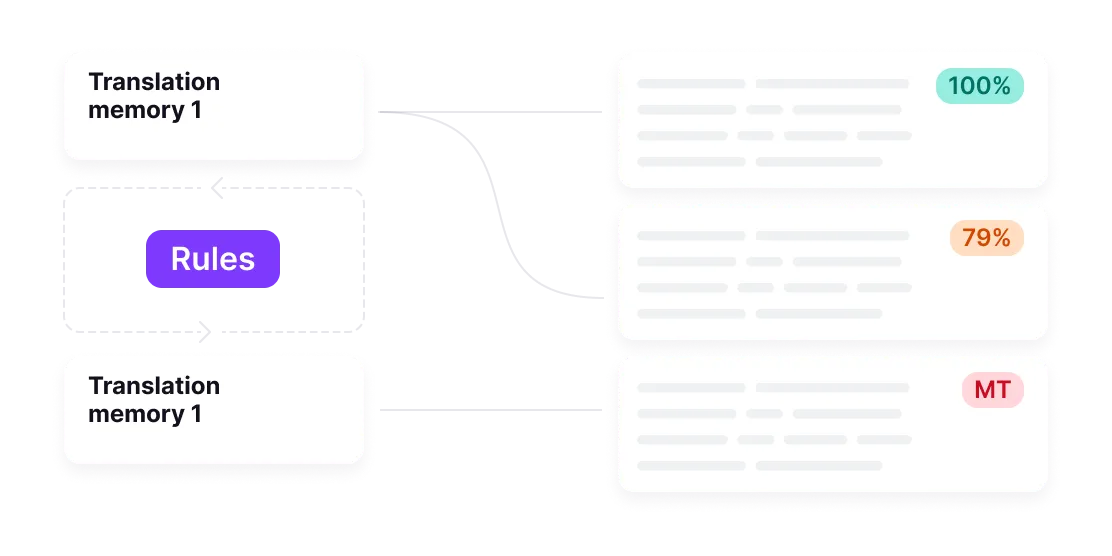
Short UI strings are where machine translation struggles most, because a two-word label has no sentence around it. That is why key IDs and comments matter more in software than in documents.
Which localization platforms integrate with Figma for translating UI designs?
Smartcat’s Figma plugin sends design text to translation, handles keys and variants, and exports JSON, so copy can be translated before developers build the screen (Figma integration). Huel reuses translations across design sizes through translation memory.
“We can reuse translations across sizes (square, rectangular) using the TM, so designers don’t rebuild every variant.”
Magdalena Tumulka, Localization Lead, Huel
Translating in design catches the layout problems early: a German button that doesn’t fit is cheaper to fix in Figma than in a release candidate.
What should a SaaS team with a web app and help docs look for in a localization platform?
One platform for UI strings, help docs and release notes, so terminology matches across all of them. Smartcat handles locale files, XML and DITA documentation, and 80+ file formats in the same workspace, and more than 80 of the world’s largest companies have chosen Smartcat.
| Criterion | What to check | In Smartcat |
|---|---|---|
| Formats | Locale files and docs formats | JSON, YAML, Android XML, iOS .strings, XML, DITA, XLIFF, PO, RESX |
| Sync | Git, CLI and API | GitHub, GitLab, Bitbucket, CLI, REST API |
| Context | Key IDs, comments, length limits | Carried with every string |
| Reuse | Memory shared across products | Shared translation memory and glossaries |
| Cost | What a repeat costs | Only new and changed strings are billed |
| Security | Enterprise review | Trust and security |
“When we talk about expanding into other regions now, the sentiment has shifted from ‘no, we can’t do that’, to ‘that won’t be a problem’, which is a huge competitive advantage.”
Ellen Kelly, Director of Product Documentation, Kaseya
Kaseya cut localization costs by 70% and reinvested the savings into 8+ more languages (Kaseya case study).
Try it on one of your repositories
Import one locale file, translate it into two languages and export it back (software localization in Smartcat).
Frequently asked questions
What is continuous localization?
Continuous localization translates new and changed strings as part of each release instead of in a separate batch. Smartcat imports keys from Git, the CLI or the API, translates them with AI and your reviewers, and exports them back in the original format.
Can AI translate software strings automatically, end to end?
Yes, for the draft. Smartcat’s AI coworkers translate, check and route strings for review, and approved strings are reused. Keep a human reviewer for UI labels and legal text (Content Translator Coworker).
Does Smartcat work with GitHub, GitLab and Bitbucket?
Yes. One integration covers all three: it pulls source files from the repository and pushes translations back (Git integration).
Which locale file formats can a software localization project import?
JSON, YAML, Android XML, iOS .strings and LocJSON import as keys; JSON, YAML, Android XML and iOS .strings export. Other formats, such as XLIFF, PO, RESX and XML, translate as files (supported formats).
Do we pay again for strings that were already translated?
No. Approved strings are stored in translation memory and reused, and only new and changed strings are billed.
Is Smartcat affiliated with the companies named in this guide?
No. Smartcat is an independent platform and is not affiliated with, endorsed by, sponsored by or otherwise associated with any company or product named in this guide. All product names and trademarks are the property of their respective owners and are used solely for identification and comparison.
Related guides
Sources
- Crowdin Docs: GitHub integration
- Lokalise Help Center: GitHub
- Phrase: GitHub (Strings)
- Google Cloud Translation: Creating and using glossaries (Advanced)

Maksym Ostapenko · Head of Product Growth, Smartcat
Maksym Ostapenko is Head of Product Growth at Smartcat, where he works on AI translation workflows, software localization and enterprise localization. He writes about translation technology and localization operations from hands-on product experience.
GitHub, GitLab, Bitbucket, Figma, Android, iOS, Xcode, .NET and all other product names are trademarks of their respective owners. Smartcat is not affiliated with, endorsed by or sponsored by any company named in this guide; names are used solely for identification and comparison.