GDPR-compliant organization

ISO 27001 certified organization

SOC II compliant organization

AI course creator: turn documents into training for every market

Smartcat turns your PowerPoint decks, Word documents and PDFs into interactive courses with quizzes, then translates them into 280+ languages with your experts approving every version. Built for L&D teams training employees, partners and customers.

Book a demo

Book a demo

Our expert gives you a tailored demo

Start free trial

Start free trial

15-day free trial, no credit card required

More than 80 of the world’s largest companies have chosen Smartcat

Smartcat’s AI course creator: generated quiz questions with answer options, next to the course description, audience and learning goal

What is an AI course creator?

An AI course creator, also called an AI course builder or AI course generator, is software that turns source material such as slide decks, documents or learning objectives into a structured online course with lessons, quizzes and knowledge checks. Smartcat’s Content Creator Coworker drafts the course from your files; Smartcat then translates it into 280+ languages and sends every version to your reviewers before learners see it.

L&D teams use an AI course creator for eLearning course creation at scale: instead of writing every lesson by hand, they turn approved documents into courses and spend their time on review.

15K+

eLearning courses localized

Smartcat has localized more than 15,000 eLearning courses.

280+

languages

Translate a course into any of 280+ languages, all from the same project.

35K+

hours of video and audio translated

35,000+ hours of video and audio translated with Smartcat.

AI made courses fast. So why does training still take months to reach every market?

Drafting a course is no longer the slow part. The months go into what follows: a translation round for each language, layouts rebuilt by hand, reviews chased across regions, and the same cycle again whenever a product or policy changes. Smartcat creates the course and every language version in one workspace, so each update starts from text your reviewers have already approved.

Before: one course, then every language

× every language× every update

With Smartcat: create and translate together

Every language in one workspace

Write it from scratch

Designers storyboard and write each module before anyone can translate it.

Draft from your files

The Content Creator Coworker builds modules, lessons and quizzes from your PowerPoint, Word and PDF files.

Translate after it ships

Each language waits for its own translation round once the source course is finished.

Translate in the same project

The Content Translator Coworker produces every language version with your glossary and translation memory.

Rebuild every language

Translated text is pasted into layouts by hand, one language at a time.

One course, every language

Every language version shares the source course’s structure, so there is nothing to rebuild.

Chase reviews

Reviewers in each region get files by email and send comments back.

Approve in one place

Reviewers check every language in the browser and approve it before export.

Start over on every change

A product or policy update sends the course through the whole cycle again.

Update once

Edit the source course and re-translate only the new or changed sections.

  • Courses launch in every language

    No separate translation round after the source is finished.

  • People approve every version

    Subject-matter experts sign off before anything reaches learners.

  • Updates stay small

    Approved text is reused, so each change costs only what changed.

How to create an online course with AI

To create an online course with AI in Smartcat, upload your material, check the outline, generate lessons and quizzes, refine them in the course editor, translate the course and export it to your LMS. Your experts approve every version before it ships.

  1. Upload your material or describe the course

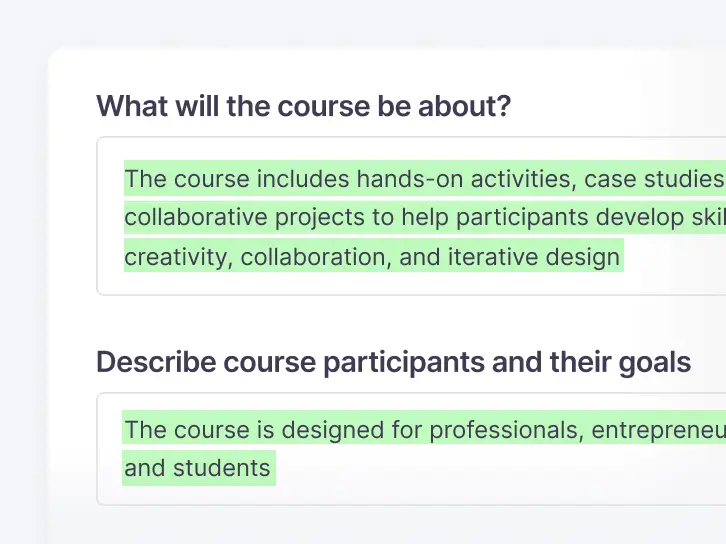
    Add PowerPoint decks, Word documents or PDFs, or type a course idea with its audience and learning objectives.

    Course setup in Smartcat: what the course is about and who the participants are
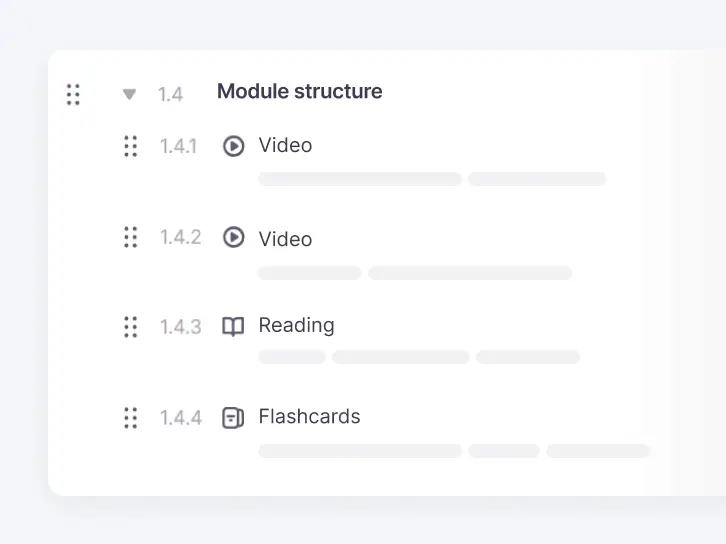
  2. Check the course outline

    The Content Creator Coworker proposes modules and lessons. Rename, reorder or remove them before any lesson is written.

    Course outline in Smartcat: a module with video, reading and flashcard lessons
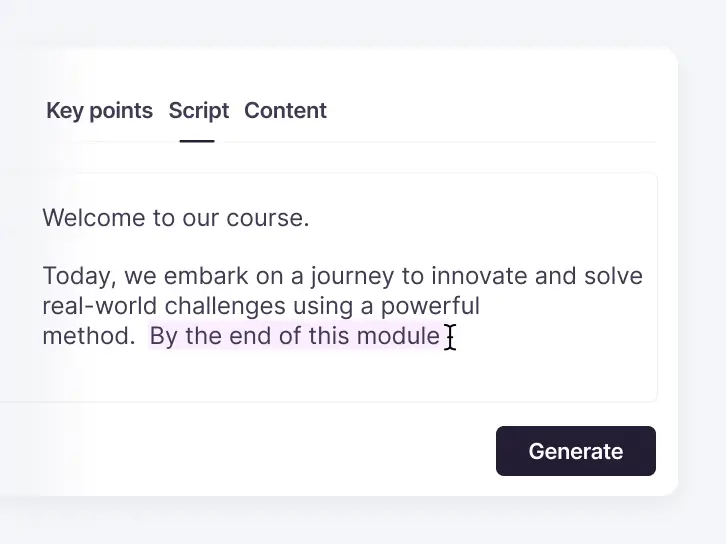
  3. Generate lessons and quizzes

    The Content Creator Coworker drafts lesson text, knowledge checks and quiz questions from your material, in your brand’s tone.

    Lesson editor in Smartcat with key points, script and content tabs and a Generate button
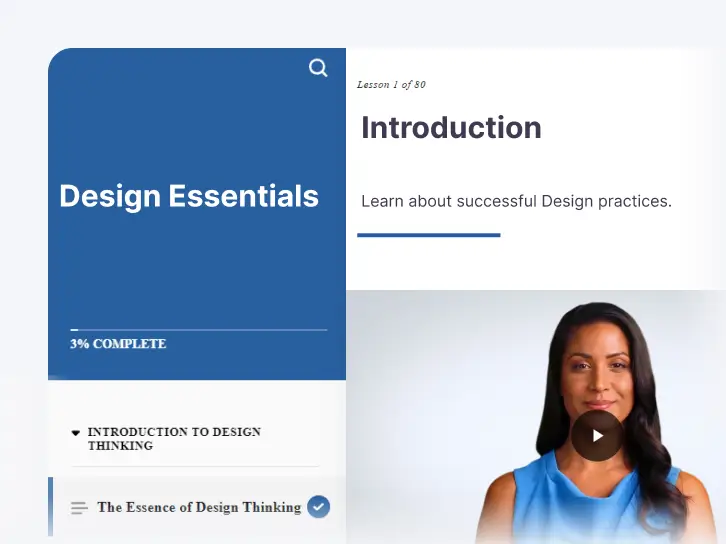
  4. Refine it in the course editor

    Edit text, swap media and add interactions such as accordions and timelines, then preview the course as learners will see it.

    Course preview in Smartcat: the first lesson with a video, as learners will see it
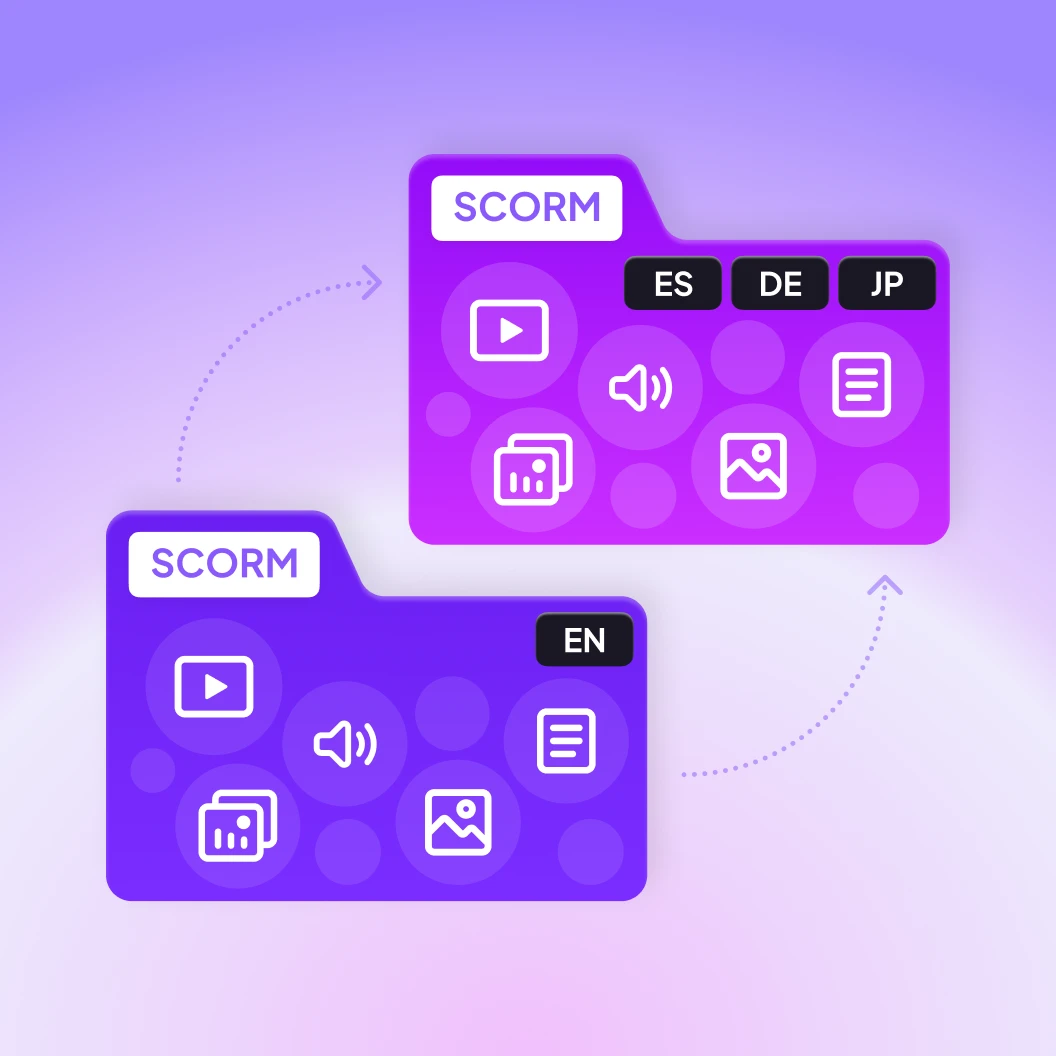
  5. Translate it for every market

    The Content Translator Coworker translates the whole course with your glossary and translation memory, and reviewers approve each language.

    An English SCORM course becoming Spanish, German and Japanese versions in Smartcat
  6. Publish it to your LMS

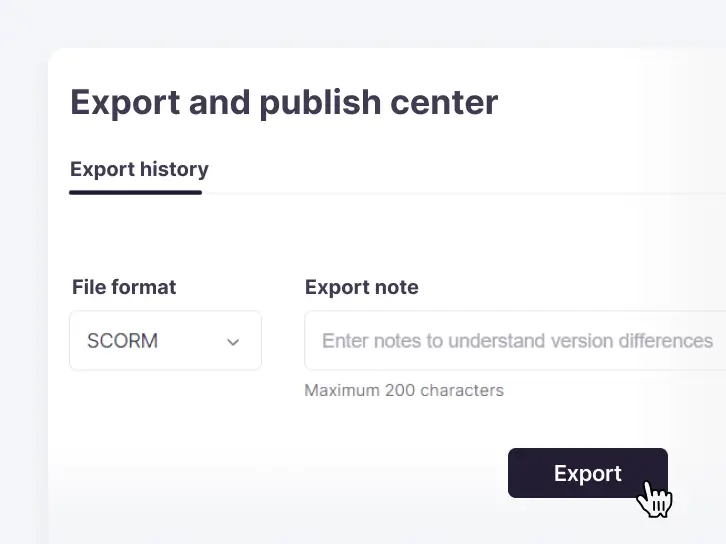
    Export the course as a SCORM package for your learning management system. The SCORM course builder covers SCORM export in detail.

    Export and publish center in Smartcat with SCORM selected as the file format

See the AI course creator in action

Click through real product demos: create a course, translate it and turn existing material into new training.

What should you look for in an AI course creator?

Check these things: what the AI course creator can read, how much editing control it leaves you, which quiz types it makes, and what happens when a course needs another language, an update or a place in your LMS. Most AI course builders can draft lessons from a prompt; these checks are where they differ.

What to checkWhy it mattersHow Smartcat handles it
Source materialCourses built from your own documents start from approved content; prompt-only drafts need more fact-checking.Drafts courses from PowerPoint, Word and PDF files, or from a course idea with learning objectives and audience.
Quizzes and interactionsKnowledge checks and interactions are what turn a document into a course.Single and multiple choice, sorting, matching and open questions, plus accordions, processes and timelines. For pixel-level slide design, a desktop authoring tool gives you more control.
Editing controlSubject-matter experts need to fix wording and media without starting over.Every element stays editable in the course editor until export, and reviewers work in the browser with nothing to install.
LanguagesA course in one language reaches only part of a global workforce.Translates the whole course into 280+ languages in one project. AI voiceover covers fewer languages than text, so check the voices before you scope a dubbed course.
VideoDemonstrations and role-plays often carry the most important lessons.Adds subtitles or AI voiceover to course video. Text burned into video frames is not translated.
Human approvalCompliance and product training can’t go live on unchecked AI output.Your reviewers or Smartcat Marketplace linguists approve each language before export. Users are unlimited, so reviewers add no seat costs.
LMS deliveryThe course has to launch and report completion in the LMS you already run.Exports SCORM packages for SCORM-compliant LMSs. Planning xAPI or cmi5? Confirm your setup in a demo first.
UpdatesProducts and policies change, and rebuilding every language each time is where the months go.Edit the source course and re-translate only new or changed sections. 100%+ translation-memory matches use no Smartwords on current plans.
Data securityCourse material often includes unreleased products and internal policy.SOC 2 Type II, encryption in transit and at rest, and your content is never used to train public AI models.

Comparing tools? Run the same document through each one and compare the outline, the quiz questions and one translated lesson. Smartcat’s free trial gives you 15 days and 15,000 Smartwords, with no credit card required.

AI training course creator for corporate training

Smartcat creates employee training from the documents your teams already maintain: onboarding, compliance, product knowledge and training video, each with a version for every market.

eLearning courses

Interactive courses with lessons, quizzes and knowledge checks, built from documents your team already maintains.

Training videos

Course video with subtitles or AI voiceover, so every region hears the lesson in its own language.

Multilingual eLearning

Bring courses you already have into Smartcat and translate them for every market your learners work in.

Onboarding programs

One onboarding course built from your existing material, ready for new hires in every language.

Compliance training

Policy and safety modules drafted from approved documents, with a reviewer signing off each language.

Product knowledge training

Product sheets and release notes turned into training for sales and service teams in every market.

See a course drafted from your own training material

How to create a course from PDFs, Word files, slides and video

The steps are the same for every source. What changes is what to prepare and what to check before the course reaches learners.

Start from the material you already have

Create a course from a PDF

Upload a PDF manual, policy or guide, and the Content Creator Coworker splits it into modules and lessons and drafts knowledge checks from its key points.

Built from a document your experts already approved, so their review can focus on structure and flow.

Turn a PowerPoint deck into an online course

Upload the PPTX, and the Content Creator Coworker drafts course modules from the slides, which you edit, extend with quizzes and export.

Decks written for a live presenter often leave out what the speaker said, so add that context in the course editor.

Turn a Word document into an eLearning course

Upload a procedure, handbook chapter or job aid, and the Content Creator Coworker drafts modules, lessons and knowledge checks from it.

One topic per section gives the cleanest first outline. Rename, reorder or remove modules before any lesson is written.

Build a course around a training video

Start from the video’s script or transcript as a Word or PDF file, and the Content Creator Coworker drafts lessons and knowledge checks. Then add the video to a lesson.

Check the available voices before planning a dubbed course, and keep on-screen text out of the footage: text burned into frames is not translated.

Generate a course from an idea

No source document yet? Describe the topic, the audience and what learners should be able to do. The Content Creator Coworker turns those objectives into an outline, then drafts each module.

Have a subject-matter expert check every fact: a course written from a prompt has no source document to check against.

Reuse existing course material

Older courses, handouts and job aids can seed a new course. Or keep them as they are and translate them, so a slide deck comes back as a slide deck.

Course already in an authoring tool? Export it as XLIFF; Smartcat translates the file and returns it ready to re-import.

Shape the course

Add quizzes and knowledge checks

The Content Creator Coworker drafts questions from your material, and you pick the format.

Single choiceMultiple choiceSortingMatchingOpen questions

Ask an expert to check every answer key, and keep question wording simple so it translates cleanly.

Create compliance training

Build compliance courses from text your legal or HR team has already approved, not from a prompt. A reviewer approves the wording in every language before export.

81%

saved even by teams that rely mostly on human linguists

Make a mini course or microlearning module

For a single procedure, product update or policy change, ask for a short course with a few lessons and one quiz.

  • Easier to review
  • Easier to re-translate
  • Suits content that changes often

Where it fits next to your authoring tools

A learning content creation tool for L&D teams

For teams that build more courses than their designers can write by hand: the Content Creator Coworker drafts from approved documents, and instructional designers spend their time on structure and review.

  • Every course in one workspace
  • One glossary and translation memory
  • New modules, updates and languages start from approved content

AI course creator or desktop authoring tool?

Many L&D teams use both, and Smartcat also translates courses built elsewhere: upload the SCORM package or an XLIFF export.

AI course creator
  • Drafts structure, lessons and quizzes from material you have
  • Suits many courses, frequent updates or several languages
Desktop authoring tool
  • Fine control over slides, branching and custom interactions
  • Suits a few high-polish courses

How Topcon scaled its eLearning across markets

Topcon’s training team localizes eLearning for employees, dealers and customers on Smartcat, working with Marketplace translators who have learned its products and brand voice.

298

projects completed in two years

“We have produced 298 projects; of these, over 80% were for eLearning courses. Smartcat allowed us to increase our initial two target languages to ten easily and quickly.”

Read the Topcon case study

Michelle Quirke

Program Engagement Manager, Topcon

29

countries supported

Topcon’s training reaches teams in offices across 29 countries.

31

languages translated

Its course and documentation projects now cover 31 languages.

11 h

to produce one eLearning course in 10 languages, down from 13 h

Automated project setup saves about two more hours per course.

Get the same results for your own training

What enterprise teams say on G2

Explore more L&D content

Guides, webinars and articles for teams that create and translate training.

The AI coworkers behind the work

The Content Creator Coworker drafts the course. These coworkers coordinate, translate, update and check it, and your team approves every version.

Connect Smartcat to the tools your training content lives in

Translate and review content where your teams already work, from Google Drive and Figma to your help center and CMS. See all integrations

Frequently asked questions

What is the best AI course creator?

The best AI course creator for you depends on where your courses go after the first draft. If they must reach learners in several languages, Smartcat fits, because the same workspace creates the course, translates it and routes it for approval. Test each tool with one real document and check draft accuracy, quiz formats, editing control, LMS export and updates. If you’re an individual creator selling courses online, a course platform with built-in payments will suit you better than Smartcat.

Is there a free AI course creator?

Many AI course creators offer a free plan or trial that limits the number of courses, exports or features. Smartcat offers a free trial rather than a free plan: 15 days and 15,000 Smartwords, with no credit card required. The trial includes course creation as well as translation, so you can build a course from your own material, translate it and test it in your LMS before you choose a plan.

How do I create a course with AI?

Start from material you already have. In Smartcat’s AI course creator, you upload a PowerPoint, Word or PDF file or describe the course, accept an outline, and let the Content Creator Coworker draft lessons and quizzes. Then you edit, translate and export the course as a SCORM package for your LMS. Plan time for a subject-matter expert to check facts and answer keys before learners see it.

How accurate is an AI course generator?

An AI course generator is only as accurate as the material it drafts from. In Smartcat, a course built from an approved PDF or slide deck needs a structure and flow review, while a course written from a prompt needs every fact checked. For the translated versions, 92% of words translated by Smartcat AI are accepted without a single human edit, and your reviewers approve each language before export.

How long does it take to create a course with AI?

Drafting is the fast part: the Content Creator Coworker proposes an outline and writes lessons and quizzes from your material in one session. Most of the time goes to expert review, and to one review round per language. That’s why Smartcat creates, translates and routes every version through approval in the same workspace.

Do I need instructional design skills to use an AI course creator?

No, but they make the result better. Smartcat structures each course around the learning objectives you enter and drafts lessons and quizzes from your material, so a subject-matter expert can produce a solid first draft. An instructional designer then reviews the flow, the assessments and the interactions before the course goes live.

Can I sell the courses I create with Smartcat?

Smartcat is built for company training, not for selling courses online. It creates and translates courses for employees, partners and customers and exports them as SCORM packages for your LMS. If you want to sell courses to the public, a course platform with sales pages and payments is a better fit.

What is Smartcat’s AI course creator?

Smartcat’s AI course creator is the Content Creator Coworker, an AI coworker that builds training courses from your inputs. You enter course objectives or upload PowerPoint, Word or PDF files, and it structures the curriculum, drafts lessons and quizzes and hands the course to your team to edit. Smartcat then translates it into 280+ languages with your glossary applied, and reviewers approve each version.

Does Smartcat offer an AI curriculum generator?

Yes. Smartcat’s Content Creator Coworker generates a course curriculum from your inputs: enter the course objectives and target audience, and it structures the course into modules and lessons. You can rename, reorder or remove modules, add existing material and then let it draft each module’s content. Because the curriculum sits in the same workspace as translation, the finished course can be produced in 280+ languages without a rebuild.

Can Smartcat create courses in several languages at once?

Yes. Smartcat translates a course into any of 280+ languages, and one project can carry every target language, so a single course produces all its language versions. Right-to-left languages are supported. AI voiceover for course videos covers fewer languages than text, so check the available voices before you scope a dubbed course. Reviewers then approve each language in the browser.

How do human experts work with Smartcat’s AI coworkers?

Smartcat’s AI coworkers prepare the work, and people decide what ships. Invite your trainers and subject-matter experts to review courses and translations in the Smartcat Editor, or bring in vetted linguists from the Smartcat Marketplace. Every confirmed edit is stored and reused, so the coworkers’ output improves with each project. Users are unlimited, so adding reviewers adds no seat costs.

How is AI course creation priced in Smartcat?

Smartcat prices course creation by usage, measured in Smartwords. In the course editor, generated text uses 1 Smartword per word, video 10 Smartwords per word and each AI image 20 Smartwords. Translation uses one Smartword per source word for each target language. Enterprise teams using Smartcat cut translation costs by 96% compared with traditional agency rates. Unlimited users share your plan’s allowance, and 100%+ translation-memory matches use no Smartwords on current plans. See the pricing page.

Is it safe to upload internal training documents to Smartcat?

Yes. Smartcat is SOC 2 Type II compliant and ISO 27001 certified, encrypts content in transit and at rest and isolates every workspace, with role-based access, SSO and audit trails on enterprise plans. Documents you upload to build courses, such as policies, product material and internal procedures, are never used to train public AI models, and they are deleted or returned within 30 days of a written request. Details are on the security page.

Didn’t find your answer? Talk to an L&D specialist

Create your next course once and train every market in its own language

See the Content Creator Coworker draft a course from your own document, then watch Smartcat translate it and route it for review.